Participant
June 20, 2018
Answered

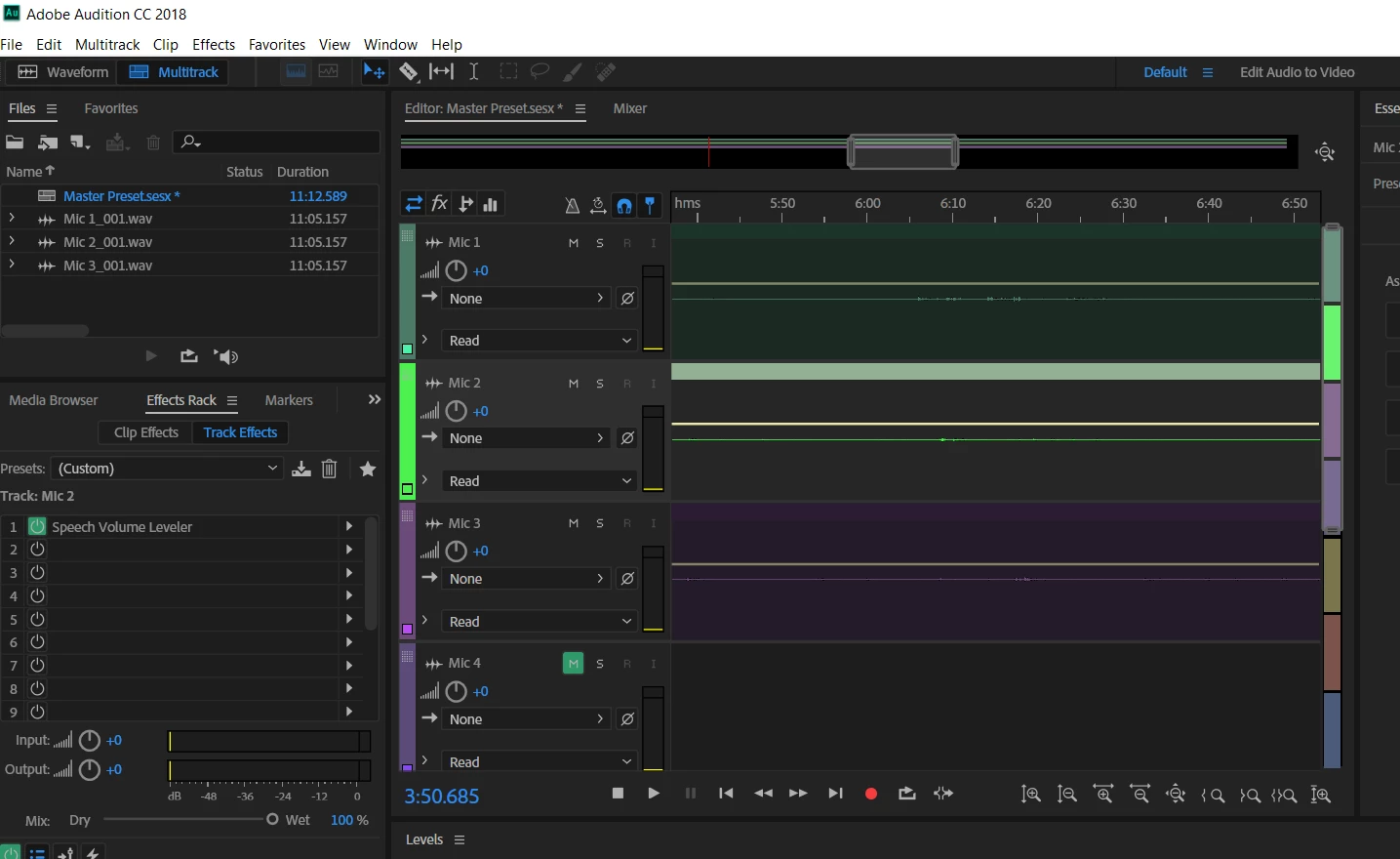
Extremely small waveforms in multitrack.

  • June 20, 2018
  • 2 replies
  • 3667 views

I have good input signal, I can hear all my mics very well, the recording is being made and I can hear it playback perfectly.

Why are my waveforms so small? They're almost non-existent. I'm guessing I'm missing something pretty simple here. But I'm just getting started, and I can't figure this out.

Would be hard to edit this.

Any help would be greatly appreciated.

    Correct answer SteveG_AudioMasters_

    In the original question it says 'I have good input signal, I can hear all my mics very well, the recording is being made and I can hear it playback perfectly.'

    And that's the problem. You can hear something perfectly well at -60dB if you crank up the volume, but that doesn't in the slightest make it a good recording. You either have to normalize the signal on the track before putting it into Multitrack view, or record it properly in the first place. This involves looking at the track metering and making sure that your signals fall into a sensible range. With digital systems this means that your recording should peak around -12dB - this allows for the occasional 'over' without overload. At that point you can either normalize, or probably you will have enough signal to have it fully visible anyway.

    And this is not mumbo-jumbo - this is normal professional practice.

    2 replies

    Participant
    August 28, 2018

    Looking for this answer as well and there is just mumbo jumbo nonsense. No one seems to know how to solve this issue. Adobe can you help filter out all the nonsense? How do you fix this!?

    SteveG_AudioMasters_
    Community Expert
    SteveG_AudioMasters_Community ExpertCorrect answer
    Community Expert
    August 28, 2018

    In the original question it says 'I have good input signal, I can hear all my mics very well, the recording is being made and I can hear it playback perfectly.'

    And that's the problem. You can hear something perfectly well at -60dB if you crank up the volume, but that doesn't in the slightest make it a good recording. You either have to normalize the signal on the track before putting it into Multitrack view, or record it properly in the first place. This involves looking at the track metering and making sure that your signals fall into a sensible range. With digital systems this means that your recording should peak around -12dB - this allows for the occasional 'over' without overload. At that point you can either normalize, or probably you will have enough signal to have it fully visible anyway.

    And this is not mumbo-jumbo - this is normal professional practice.

    ryclark
    Participating Frequently
    June 20, 2018

    Yes, they certainly look very much smaller in amplitude that they should. What levels do they show on a) the Track meters and b) the Main meters when you play back the audio? Do the waveform look the same when opened in the Waveform editing view?

    I notice that you have the Speech Volume Leveler effect added into Track 2's FX Rack. This will, unfortunately, probably make it sound as if your audio levels are OK even when they aren't. Is there a huge difference between levels indicated on the Input and Output meters of the FX Rack? Normal level for recording speech should be around -18dBFS on Audition's meters with peaks going up to about -12 or -10.