
Inspiring
March 13, 2018
Answered

Fade button disappeared on multitrack editor

  • March 13, 2018
  • 1 reply
  • 1175 views

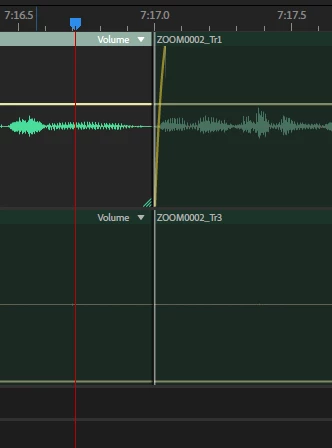
I've had this happen multiple times. The overlaid fade-out button will simply disappear for one part of a track. Nothing I can do will get it back. The fade works fine on other clips. Where did it go?
 

    This topic has been closed for replies.
    Correct answer Foxtrot1_1

    I figured it out. Weirdly, under the clip menu it said that there was a fade-out on this clip - but selecting "no fade" wouldn't get rid of it. I moved the clip ahead of it and expanded the affected clip and the fade icon came back. No idea why it wasn't displaying.

    1 reply

    Foxtrot1_1AuthorCorrect answer
    Inspiring
    March 13, 2018

    I figured it out. Weirdly, under the clip menu it said that there was a fade-out on this clip - but selecting "no fade" wouldn't get rid of it. I moved the clip ahead of it and expanded the affected clip and the fade icon came back. No idea why it wasn't displaying.

    ryclark
    Participating Frequently
    March 13, 2018

    Were the clips overlapping at all or had one ended before the next one started? Normally if you overlap the clips Audition will add a Crossfade anyway. Was the fade out very short so didn't show on the zoom level that you were at?

    Inspiring
    March 23, 2018

    The clips do not overlap. This is happening again with a different track in a different session. There is no fade there, the zoom level has no effect on visibility. I don't know how to fix this - moving the clip shows the fade again, but snapping it back to the original spot makes it disappear.