
Known Participant
February 26, 2019
Question

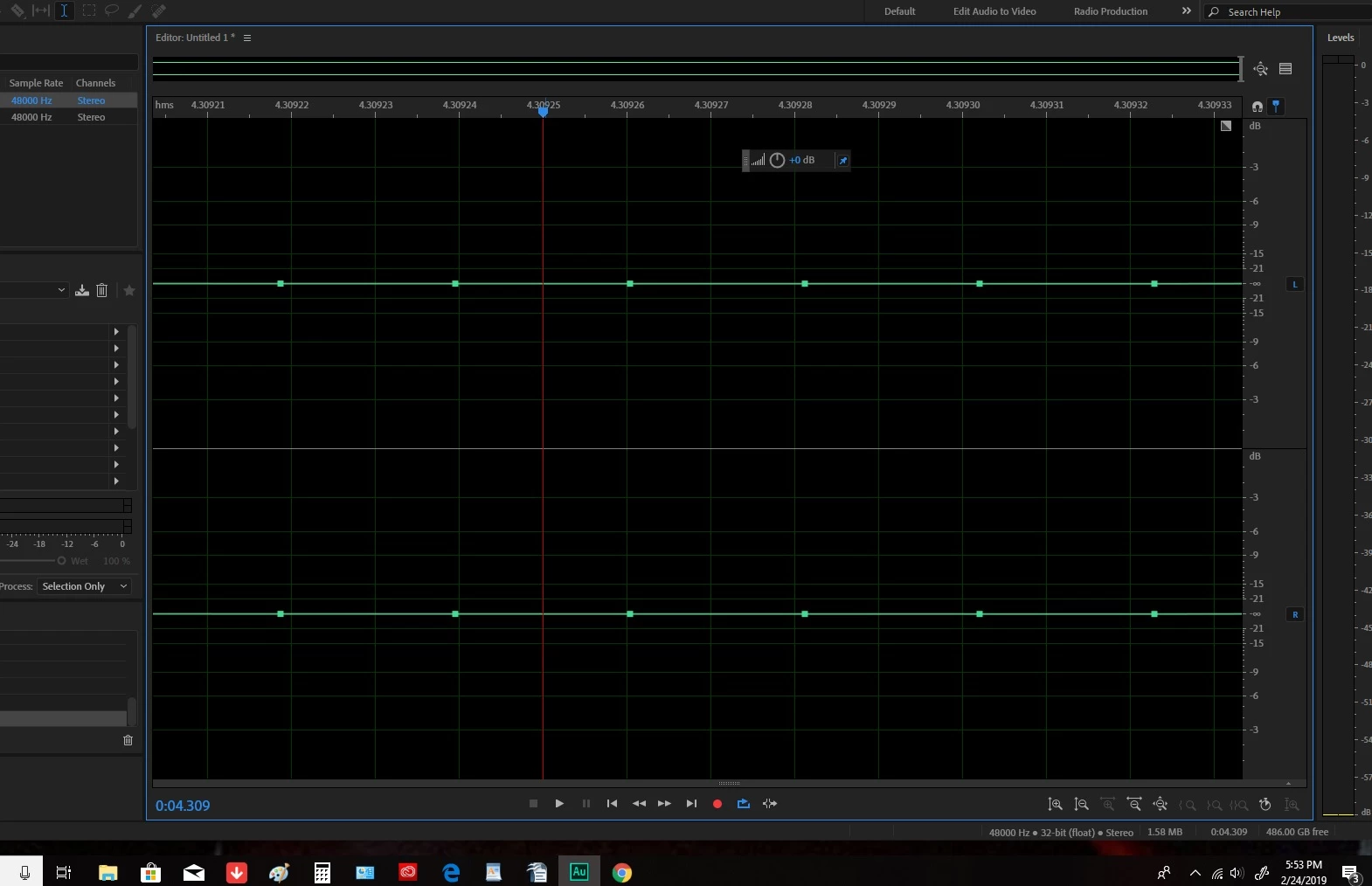
finally got a screenshot re: green line/squares

  • February 26, 2019
  • 2 replies
  • 429 views

Okay here it is, the green line-with-boxes-squares-going-through-thing. I did find out that it is actually recording. I thought it was just a bug but it is recording because after I hit stop I accidentally hit the spacebar and I could hear my voice saying "oh there's the green boxes." Usually I just hit delete and it clears it and then I hit record and usually it begins the normal waveform. But recently sometimes I have to delete the green lines with boxes two or three times to get a recordable screen.

My newest problem now is when I plug in my earbuds to my computer to listen to my playback I'm getting echo. It used to be as soon as I said "okay" to a screen prompt "what did you just plug in?", it would go back to a normal contained sound. Now I can't get rid of the echoey sound that is going on.

Thanks in advance.
    This topic has been closed for replies.

    2 replies

    Known Participant
    February 26, 2019

    Ahhhhh, interesting, Steve, thanks very much. And thanks for the shortcut heads up, Ryclark.

    SteveG_AudioMasters_
    Community Expert
    Community Expert
    February 26, 2019

    You can tell from the time display that those are individual samples. All that's happened is that for whatever reason, you're zoomed right in on the waveform. Not only that, but it's easy to tell that this is right at the end of your 4 minute recording. To see the whole waveform, you need to hit the button that I've circled in red:

    That's the 'Zoom out all axes' button, and will reveal the whole of your waveform.

    ryclark
    Participating Frequently
    February 26, 2019

    Or you can use the '\' (backslash) keyboard shortcut.