Participant
Aug 30, 2022 1:12 PM UTC
Answered

First time using Audition and not exporting

Hello,


It dosnt let me export the file using the multitrack editor, does anybody know why this might be.
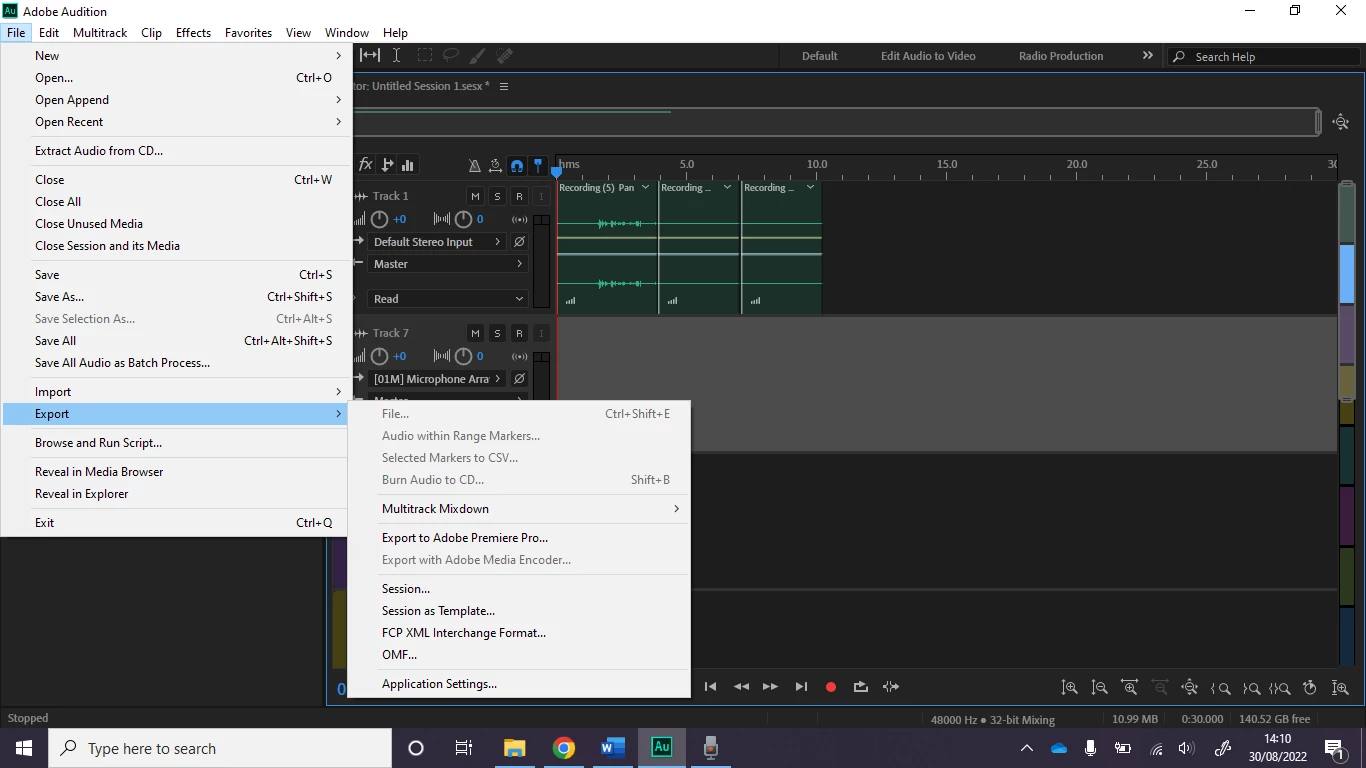
As shown here I cant export as file.

Does anybody know why this is please?

Many Thanks

This topic is closed to new replies. Start a new post to keep the conversation going.
SteveG_AudioMasters_
SteveG_AudioMasters_Correct answer
Community Expert
Aug 30, 2022 1:33 PM UTC

There is no file to export at present - that's just some clips, which represent playback information about a file they came from. Clips aren't 'real' audio at all. If you want to export the results of your session, then you create the mixed file by using File>Export>Multitrack Mixdown, and then either use a time selection you've already made, or the entire session.

2 replies

SteveG_AudioMasters_
Community Expert
SteveG_AudioMasters_Community ExpertCorrect answer
Community Expert
Aug 30, 2022 1:33 PM UTC

There is no file to export at present - that's just some clips, which represent playback information about a file they came from. Clips aren't 'real' audio at all. If you want to export the results of your session, then you create the mixed file by using File>Export>Multitrack Mixdown, and then either use a time selection you've already made, or the entire session.

Translate
Participant
Aug 30, 2022 2:23 PM UTC

Many Thanks

Translate