Answered
Got this frequency line ?
Hi,
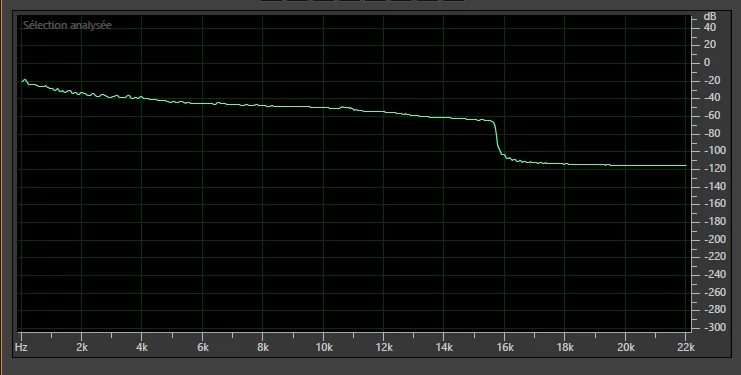
I wonder to know how to got this frequency line for a final mix. Reduce after 16KHZ.

Hi,
I wonder to know how to got this frequency line for a final mix. Reduce after 16KHZ.
You probably right, it's from audio HD trailer of movie.
| Format | : AAC |
| Format/Info | : Advanced Audio Codec |
| Format profile | : LC |
| Codec ID | : 40 |
| Duration | : 2 min |
| Source duration | : 2 min |
| Bit rate mode | : Constant |
| Bit rate | : 128 kb/s |
| Channel(s) | : 2 channels |
| Channel positions | : Front: L R |
| Sampling rate | : 44.1 kHz |
| Frame rate | : 43.066 FPS (1024 spf) |
| Compression mode | : Lossy |
| Stream size | : 2.27 MiB (1%) |
| Source stream size | : 2.27 MiB (1%) |
I think that just about everything that's released in the form of movie trailers has compressed audio, and 128k is pretty standard as an MP3 rate.
You may think that audio coded at 128k sounds great, but to me it just sounds distorted - mainly because it is, by the lossy masking process involved in the coding. The people that do audio for films know this, and do their best to compensate for it, but it's never really successful. You have to bear in mind that MP3 has only ever been intended to be a distribution format, and when you use it as a final distribution of material, you have to be pretty careful about various aspects of what you're coding - not least of which is the levels. It's not safe, for instance, to code signals that peak at 0dB, as this often results in clipping where there wasn't any before; peaks at -2dB generally result in a much cleaner file, especially at low rates like 128k. And some sorts of signals really don't do too well in the coding process - anything that's relatively steady (held chords) with something else that changes a lot (singing) over the top is very likely not to sound the same, as the coding process for the steady signals will be compromised by the varying one. The lower the rate, the worse this sounds.
If I send out MP3 progress copies, the lowest rate I'm prepared to use is 192k, and even that's compromised somewhat.
Already have an account? Login
No account yet? Create an account
Enter your E-mail address. We'll send you an e-mail with instructions to reset your password.


 AdChoices