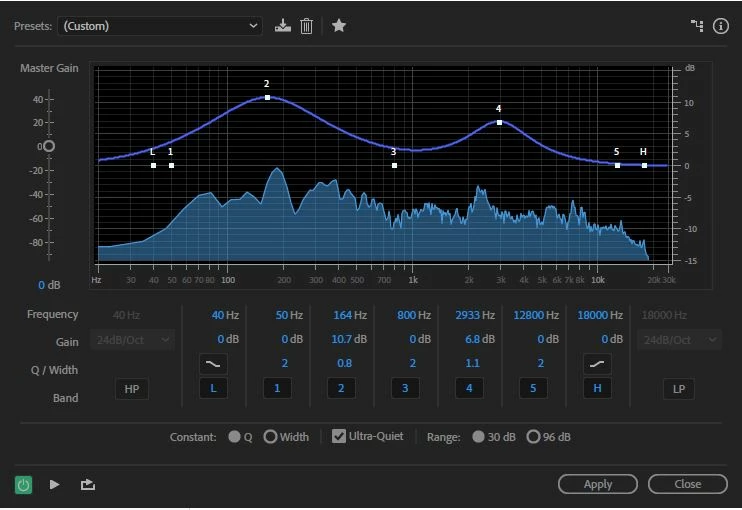
There are so many variables here that it would take a while to work through them all. If you want a simple solution that will fix quite a bit of this, then you need to EQ the podcaster - or preferably set it up in a more acoustically sympathetic environment, although that probably won't be so easy (although a slightly deader space would help...). I got the two samples to sound a lot more like each other just by using some EQ on the school one - here's a screen-grab of the settings I used:
But - and it's important - you'll never get a Rode Podcaster to sound anything really like the mics they'd typically use in a radio station, despite all their claims about it being a broadcast mic, etc. Compared to a proper broadcast mic they have very little 'warmth', and that shows clearly in the recording. And you can't do the other thing that a radio station would normally do - use a broadcast mic processor on it. These are optimised for close-mic use and use all sorts of tricks to get a 'smooth' output - including limiting and compression. As the Rode is a USB mic that connects directly to your computer, this option is not available to you. The best you could hope for is to find a combination of post-recording treatment that works for you, and store it as a preset in the Effects Rack. Typically you'd want to limit the peaks, possibly add a little compression and then the EQ. The order of doing that is important; if you EQ first, then the compression will promptly mess it up. In Audition you could also play around with the Mastering section, or even the vocal enhancer, but I couldn't get either of those to produce as good a result as just applying some EQ.
If you want to know how I arrived at those settings above, it was simple; I placed both tracks in Waveform view and just A-B'd them, adjusting the EQ until the school one sounded much more like the radio one. There's no magic - just a laptop, and a pair of Beyer headphones.



 AdChoices