
Participant
May 19, 2023
Question

HELP! Sample rate is not supported by the current audio device

  • May 19, 2023
  • 1 reply
  • 924 views

I've used this same setup for 18 months, and suddenly I get this message:
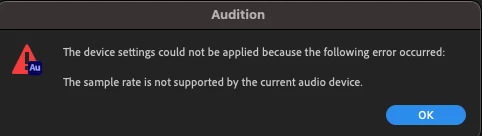
The audio device is same Edifier  S1000s I've used for some years.

Reviewing the suggestions in this thread: https://community.adobe.com/t5/audition-discussions/audition-will-not-play-on-mac-pro/m-p/10309355#M16059 … made sure "Attempt to fore hardware to dfocument sample rate" is checked, and i've turned on and off the Use machine-specific device defaults.
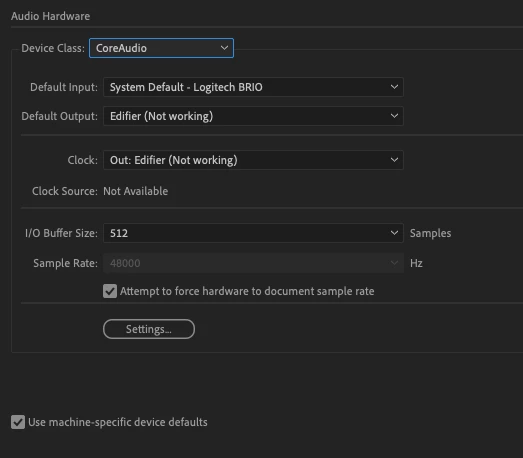
 

I'm totally stuck. Does anyone have a solution?

Specs: M1 MacMini running OS 13.3.1; Audition build 23.3.0.55

Thanks.

This topic has been closed for replies.

1 reply

SteveG_AudioMasters_
Community Expert
Community Expert
May 19, 2023

I don't have a solution, as such - it's a Mac and I don't use them. But it looks for all the world as though your sound device hasn't started. You might want to check to see if there's an updated driver for it, and also look at the settings for it to see if anything obvious is astray. I also know that devices in Macs have to be aggregated - it might be worth checking on whatever it is that achieves that. Or just hope that a Mac user comes along... Sorry, I can't be any more help than that.