
Known Participant
February 16, 2017
Answered

How Can Audition Do What Auphonic Does?

  • February 16, 2017
  • 1 reply
  • 3353 views

Is there a filter (or combination of filters) in Audition that will do what the Auphonic service does?

This is what Auphonic claims to do: Auphonic Audio Examples

I have taken multitrack mixdowns, and loaded them into Auphonic. The mixdowns consist of audio recorded in a studio, with multiple performers, using different microphones. But there always seem to be a noticeable difference in the levels for each performer. When I give the multitrack mixdown to Auphonic, it sounds a lot better, and the performers sound like they belong together. And the loudness sounds a lot better.

Below is an after-before comparison.
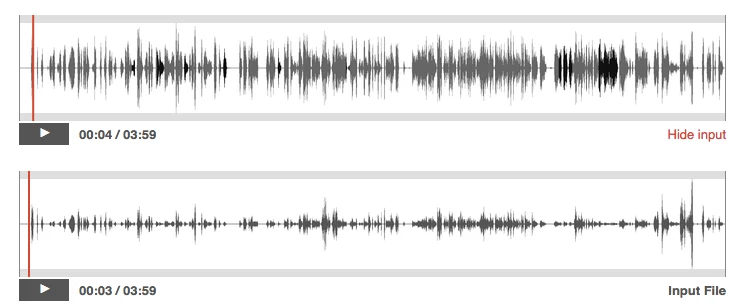
Is there an easy way for an idiot like me to do the same thing in Audition?

Thanks!

    This topic has been closed for replies.
    Correct answer SteveG_AudioMasters_

    mksalva  wrote

    Does Audition have at least one effect where it will even out the levels for me, and bring everyone up to a usable level, like in the illustration I posted in my first message?

    That's what the Speech Volume Leveler does. It's in Effects>Amplitude and Compression>Speech Volume Leveler. There are presets to get you on your way...

    1 reply

    SteveG_AudioMasters_
    Community Expert
    Community Expert
    February 16, 2017

    There's nothing in Auphonic that Audition can't do. Most of it falls under the heading of things that the Speech Volume Leveler does, and all of the other functions it offers are also available, some of them probably rather better, like the NR.

    Also, there's a degree of flexibility within Audition when it comes to stuff like this - you can, for instance, level-match individual clips in multitrack and specify the LUFS level - giving you rather more flexibility than having to process everything at once if you don't need to (right-click on a track in Multi-track to get the option easily). What it actually does is give you a level value that you have to alter your clip to to conform to the level you've specified, but that's all a part of the flexibility. You may find that Auphonic is easier to use for a lot of common tasks, but Audition will do all that it can, and plenty more besides.

    Known Participant
    February 16, 2017

    Thank you for your reply.

    I think my big problem is that I've only been working with Audition for about a year, and I don't know how to do all of that in Audition.

    With Auphonic, I load the audio file. There are several people who all have different audio levels. Auphonic spits out a WAV file where everyone is pretty much at the same level, the peaks are minimized, and there is an improvement in the room noise.

    Does Audition have at least one effect where it will even out the levels for me, and bring everyone up to a usable level, like in the illustration I posted in my first message?

    Thanks!

    SteveG_AudioMasters_
    Community Expert
    SteveG_AudioMasters_Community ExpertCorrect answer
    Community Expert
    February 16, 2017

    mksalva  wrote

    Does Audition have at least one effect where it will even out the levels for me, and bring everyone up to a usable level, like in the illustration I posted in my first message?

    That's what the Speech Volume Leveler does. It's in Effects>Amplitude and Compression>Speech Volume Leveler. There are presets to get you on your way...