wilberj24407715
Participating Frequently
Feb 20, 2017 6:29 AM UTC
Answered

How do I set the Temp Folder in Adobe CC?

My recording sessions are limited to approximately 15 minutes.

How do I increase the recording time in Adobe CC?

Advance thanx,
    This topic is closed to new replies. Start a new post to keep the conversation going.
    SteveG_AudioMasters_
    SteveG_AudioMasters_Correct answer
    Community Expert
    Feb 21, 2017 8:59 AM UTC

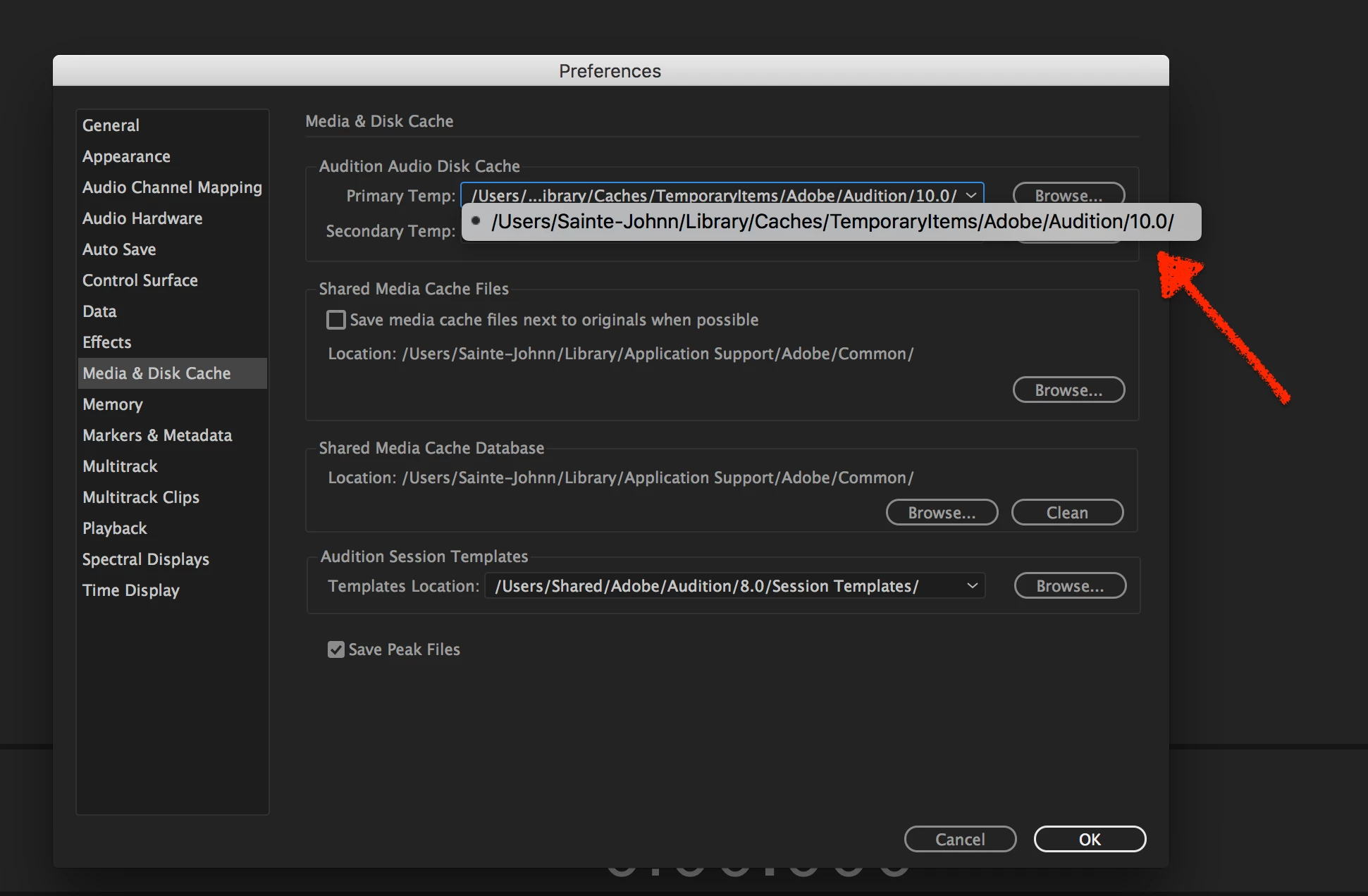
    There is not an optional adjustment from the dropdown.

    See image.

    Thanks for the reply Steve.


    See that 'browse' button next to it? Have you tried clicking on that and selecting an appropriate location?

    5 replies

    Michael J. Hoffman
    Community Expert
    Community Expert
    Feb 20, 2017 1:33 PM UTC

    Hi Wilber,

    You've posted in the non-technical Lounge area of the forums. Please let us know what Adobe software you're using ("Adobe CC" isn't the name of an application), and we'll get your post moved to the appropirate software forum for that application.

    Mike

    Translate
    wilberj24407715
    Participating Frequently
    Feb 21, 2017 12:13 AM UTC

    Oops.

    Adobe Audition CC.

    [Moved from non-technical Forum Lounge to specific Program forum... Mod]

    [Here is the list of all Adobe forums... https://forums.adobe.com/welcome]

    Translate
    SteveG_AudioMasters_
    Community Expert
    Community Expert
    Feb 21, 2017 1:00 AM UTC

    Edit>Preferences>Media and Disk cache - first item on the page.

    Translate