
Participant
November 8, 2023
Answered

How do I swap channels?

  • November 8, 2023
  • 1 reply
  • 2503 views

Hi Folks,


   I had an older version of Adobe Audition.  There are two things the old one could do that my new version seems to not be able to.

First, I could swap channels - in other words, in my Channel Edit on any stereo track I could easily swap channels.

Second thing, in my older version, I could highlight the left or right channel and edit either or - adjust the volume, or whatever else.

Can't seem to find how to do either thing.
This topic has been closed for replies.
Correct answer SteveG_AudioMasters_

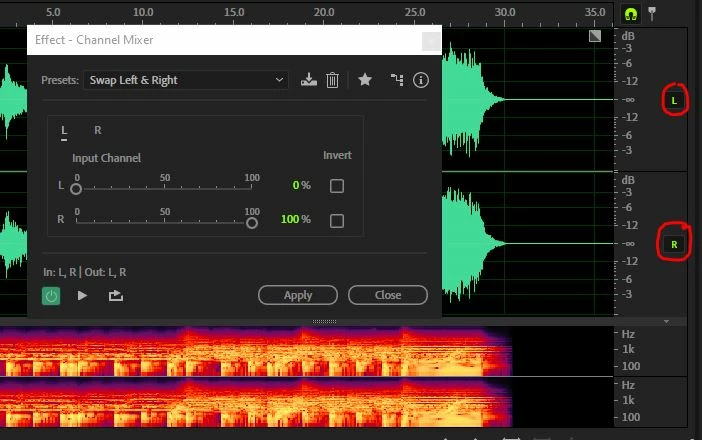
Swapping channels: Effects>Channel Mixer and select the Swap Left & Right preset. In the screengrab below I've highlighted the channel mute buttons. If you mute one channel, you can then make adjustments to just the unmuted one.

1 reply

SteveG_AudioMasters_
Community Expert
SteveG_AudioMasters_Community ExpertCorrect answer
Community Expert
November 8, 2023

Swapping channels: Effects>Channel Mixer and select the Swap Left & Right preset. In the screengrab below I've highlighted the channel mute buttons. If you mute one channel, you can then make adjustments to just the unmuted one.

Participant
November 14, 2023

Hi Steve,

   My program doesn't have what your screen shot shows.  There is no "Channel Mixer" anywhere.  Where the "Swap Channels" were in my older version was under "Stereo Imagery".  But in this new version, there is, "Stereo Channel Extractor", "Graphic Phase Shifter", and "Stereo Expander".


The Mute Channel button is there, as you showed, so thanks for that.