


How to connect to mutiple audio output?
V24.0.3.3 (Latest update), running at windows 11
How could I connect to mutiple audio output devices and let them play different tracks' audio? It's like one of the track is playing full version of a song, which is planned to output into a earphone for singer, and another track is only remixed background, output to speakers.
I tried but I had never succeed to connect two output divices (in my case, an earphone and a standard computer speaker without a built-in mixer, running MME at mode) at the same time, it seems like AU only reconize the one that I choose as "default output" in the hardware->audio device page, and the other device did not shows in the option of track output source.
Maybe this type of work is impossible? but I did saw an example done by Adobe on it's offical "Audition helps" website. (Image of this usage example attached below). As far as I could understand, Adobe connect the earphone to mix-track B for drummer and output dirrectly via mix-track A to mix-track C. Track A and C are connect into two different audio output devices and playing different sounds. Am I missunderstanding this?
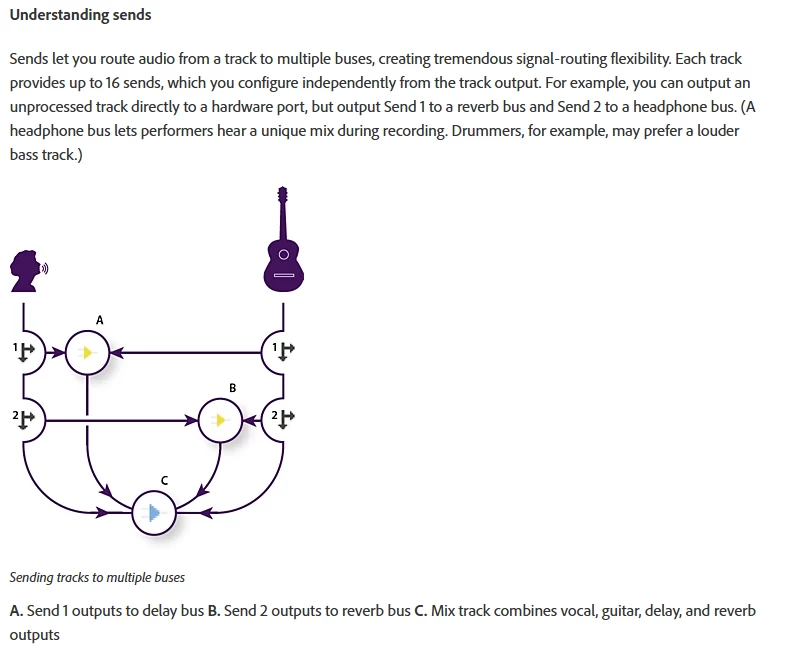
If, in any way, this type of requesment is possible to achieve, please reply for this blog. This is soo important for me due to I'm currently rely on AU for recordings, but I need to play two different sounds at the same time to two devices at the same time.
 AdChoices