
Participating Frequently
October 10, 2022
Answered

How To Correct Phase Issue

  • October 10, 2022
  • 1 reply
  • 645 views

I am working with a stereo file in which the 2 channels are slightly out of phase.  Thus, I need to move 1 of the channels to correct this.


Do I need to do this in the multitrack editor?  It seems as though I can create 2 stereo channels, each with only 1 of the 2 channels and then slide one in the multitrack editor and then mixdown the entire session.


Is this the correct way to do this?
 

This topic has been closed for replies.
Correct answer SteveG_AudioMasters_

When I do the mixdown I end up with a stereo track with both channels being a combination of the 2 mono tracks.  I want to end up with a stereo track with 1 channel being the left and 1 being the right.


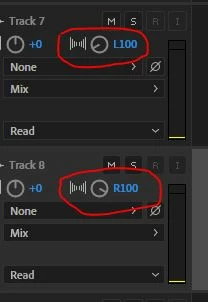
My last instruction was to use the pan controls! Pan one track to the left, and the other to the right - then they will appear in the correct places in the mix (assuming you created a stereo session, that is...)

1 reply

SteveG_AudioMasters_
Community Expert
Community Expert
October 10, 2022

Yes you need to do this in Multitrack, but first in Waveform view you should split the stereo file into a pair of mono ones - Edit>Extract Channels to Mono Files. You can then drop and manouvre these independently into a stereo session. Pan one left and the other Right, and mix down the result.

dminchesAuthor
Participating Frequently
October 11, 2022

Thanks for your response.


What I can't figure out is once I have the 2 mono tracks in phase how do I mix them down to 2 stereo track?

SteveG_AudioMasters_
Community Expert
Community Expert
October 11, 2022

When you have the tracks sounding the way you want in the session, you have two choices: File>Export>Multitrack Mixdown>Entire Session, which will give you a dialog box letting you choose a file name and location, etc, or you can use Multitrack>Mix down Session to a New File>Entire Session, which will automatically open the mix in Waveform view, and you can either Save it, or use Save As, from there.