
How to find source media start time of clip?
I have a bunch of clips that are from various source media files. For several important ones I need to find out when they start in the original source media file. Made up example: I have a clip that starts at (session) time 1:37 in the session, but it actually starts at (source media) time 52:41 in the original source media file that it references.
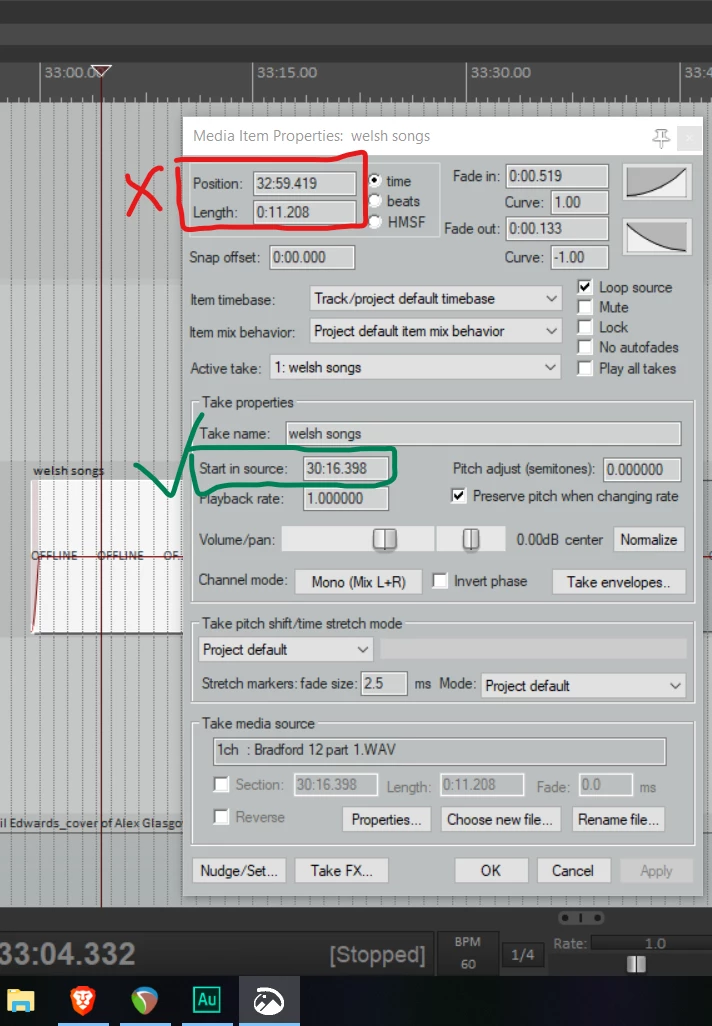
You can do this is Reaper by opening up clip properties (called media item properties in Reaper). See Reaper screenshot attached. Is there a way to do this (find the green boxed time) in Audition? The clip properties panel shows me the session start and end times, but not the source media start time.
One workaround I can use is to double click the clip in audition, bringing me to the Waveform editor. It appears that when doing this the playhead in the Waveform view automatically jumps to the corresponding time from the Multitrack view. However, I was hoping there'd be a faster way of doing this, as I need to record this timestamp for reference to a synced up file.
Thanks y'all!


 AdChoices