

Dexter Golden
Inspiring
Apr 23, 2017 9:51 AM UTC
Answered

How to reload an Older version of Audition (or any other software)

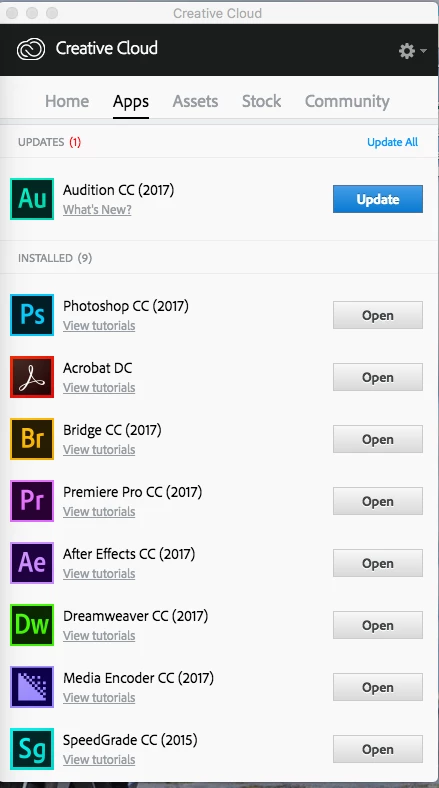
When you open up your Creative Cloud app it will look roughly like this  (mac version)
Your going to want to scroll down till you see something that looks like this:

Then your going to want to choose one of the older installations:
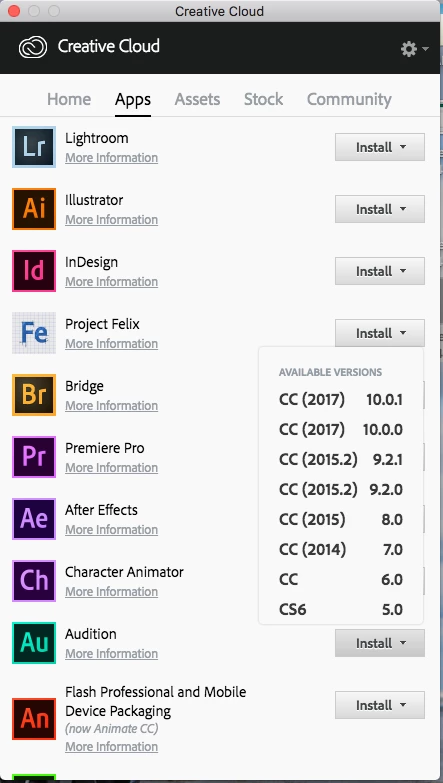
Now you should be able to pick one and re download it and your back up and running.

Once I reloaded the older version of Audition all my programs started functioning normally and I was good to go.

If someone could make this a stick so people know how to reload a previous version of software it would be appreciated.

-David and Dexter

    This topic is closed to new replies. Start a new post to keep the conversation going.
    John Waller
    John WallerCorrect answer
    Community Expert
    Apr 24, 2017 9:20 AM UTC

    Adobe has a similar article here

    Download and install Creative Cloud apps

    4 replies

    Inspiring
    May 2, 2017 2:07 AM UTC

    I figured out my issue. I had a filter on called "video". I didn't realize it was a filter, I turned it off and then saw all the apps, but not previous apps, then looked again and saw "previous versions". Then I found it. You'd think "previous versions" would still be available while you're filtering, since there would be previous versions of apps in the "video" filter.

    Translate
    Inspiring
    May 2, 2017 2:04 AM UTC

    When I go to the find additional apps it only shows me flash and a couple others, no where near the list you have, even though I have almost all of the apps installed. Any thought? 

    Translate
    Participant
    Apr 24, 2017 1:42 PM UTC

    Cheers!

    Translate
    John Waller
    Community Expert
    John WallerCommunity ExpertCorrect answer
    Community Expert
    Apr 24, 2017 9:20 AM UTC

    Adobe has a similar article here

    Download and install Creative Cloud apps

    Translate