
Participant
December 11, 2017
Answered

How to remove noise that coincides with vocals?

  • December 11, 2017
  • 1 reply
  • 1707 views

This morning I spent a couple hours recording a vocal script with a guest. The recording was conducted in one of the quietest room on the university campus, but it seems my microphone picked up some strange noise that was not audible to human ears.

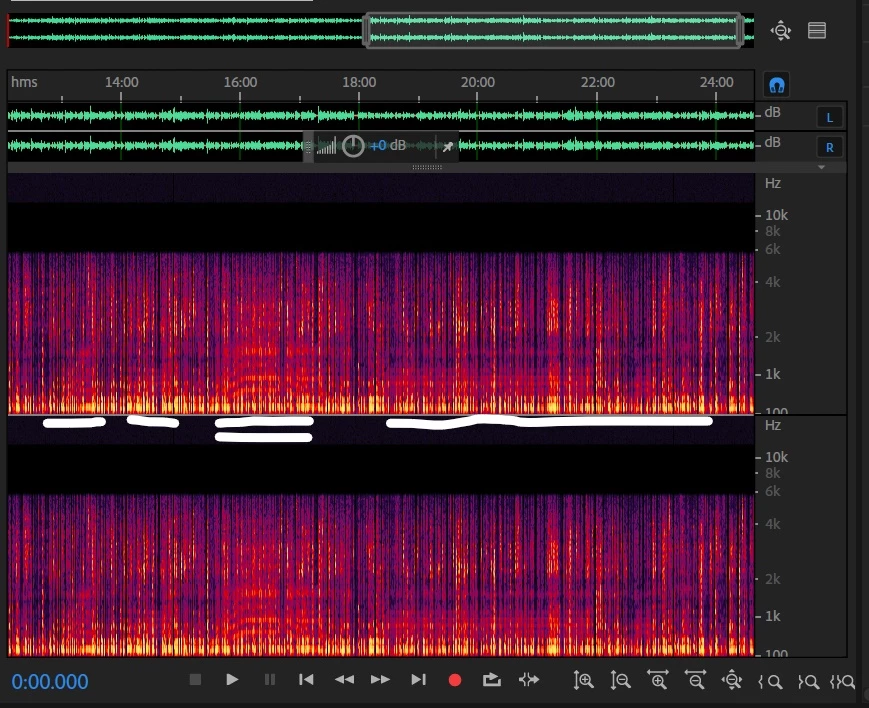
This noise almost sounds like a metallic vibration and has a slowly fluctuating tone. For most of the recording, this bizarre noise is not present at all and the voice is fairly crisp (for inexpensive equipment). The problem I'm having is that the microphone only picked up this noise when her voice was being recording; the metallic noise cut out when she was not speaking. The Audition Spectral Frequency Display shows the variation in noise frequency, but it overlaps largely with her vocal range. Below is a screen shot of a particularly afflicted clip. The double underlined section shows the tone of the noise increasing, stabilizing and then decreasing again. The other sections are just a constant pitch.

Have any of you had to deal with noise like this? Any suggestions on removing it?
This topic has been closed for replies.
Correct answer SteveG_AudioMasters_

It's not modulated by her voice as such - it sounds like radiated interference from some sort of motor that's been started within range of whatever it is you were recording with. But as it sweeps around in frequency, it's going to be very difficult to get rid of, as NR of all sorts only really works on static signals, not dynamically changing ones.

The other problem with this recording is that you've got some sort of automatic gain control switched on on the recorder, and that's what really appears to make the sound 'modulate' - the voice is pumping the record level up and down, and whatever this interference is, it's getting in the same way as the mic signals. And that makes it doubly difficult to remove.

I'd start over with this, and use a better recorder with the agc turned off, and just reduce the record level a bit. And do a test recording first, if you can't monitor what's going in on headphones, just to check that you're getting a sensible signal.

1 reply

SteveG_AudioMasters_
Community Expert
Community Expert
December 11, 2017

Sorry - can't tell you a thing without actually hearing a bit of it. All I can tell from your spectral display is that you've either saved this in a very reduced bit-rate format, or made the recording with a ridiculously low sample rate, as all the audio cuts off abruptly at 6kHz, and that's generally not going to sound very good anyway.

What we'd need to hear is a bit of exactly what you recorded in its original format, although in general the answer to your question is that any noise occurring in the same temporal space as your wanted signal is going to get the wanted signal removed with the unwanted one, and there's no getting around that, I'm afraid.

If you want to post a sample, then you need to create a copy of part of the original file (a few seconds will do, as long as it contains the problem audio), post it to something like Dropbox, and post the public link to it here on the forum. You have to do it like this, as the forum doesn't support audio uplifts to it for a reason that none of us can quite fathom...

Participant
December 11, 2017

Thanks for the response. I realize now that the screenshot I took was of the file after trying hopelessly to rid the audio of this mystery sound, thus I tried silencing the uppermost frequencies. It's not like this in the raw file, which I post below to a Google Drive link. The first couple seconds are what most of the file sounds like (not great audio, she spoke quietly but lacks this phantom noise. The Second half contains the annoying buzz.

AdobeAudition Snip.wav - Google Drive 

SteveG_AudioMasters_
Community Expert
SteveG_AudioMasters_Community ExpertCorrect answer
Community Expert
December 12, 2017

It's not modulated by her voice as such - it sounds like radiated interference from some sort of motor that's been started within range of whatever it is you were recording with. But as it sweeps around in frequency, it's going to be very difficult to get rid of, as NR of all sorts only really works on static signals, not dynamically changing ones.

The other problem with this recording is that you've got some sort of automatic gain control switched on on the recorder, and that's what really appears to make the sound 'modulate' - the voice is pumping the record level up and down, and whatever this interference is, it's getting in the same way as the mic signals. And that makes it doubly difficult to remove.

I'd start over with this, and use a better recorder with the agc turned off, and just reduce the record level a bit. And do a test recording first, if you can't monitor what's going in on headphones, just to check that you're getting a sensible signal.