
Participant
May 14, 2019
Question

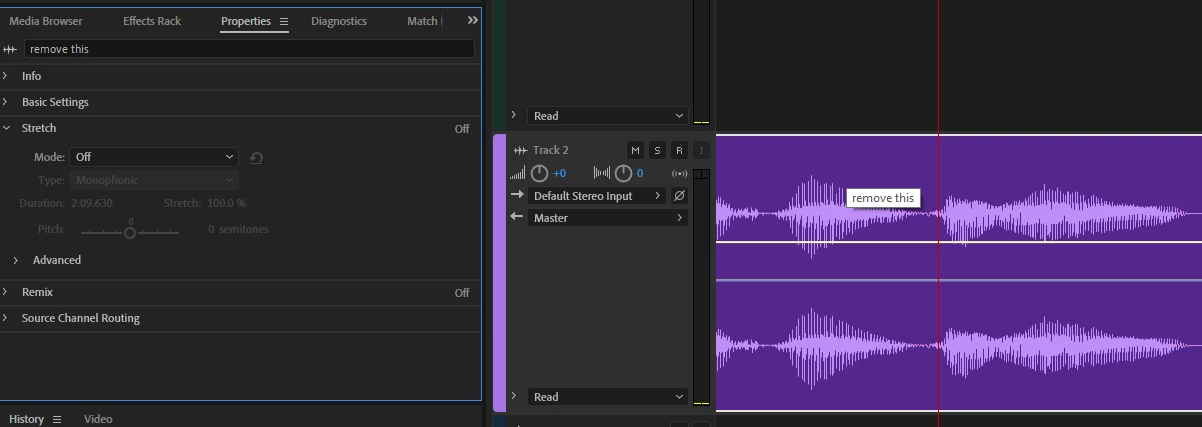
How to remove showing the clipname while hovering in Multitrack editor?

  • May 14, 2019
  • 1 reply
  • 418 views

Hello,

I am running Adobe Audition CC Build 12.0.0.241.

I am wondering if a setting exists to remove the tooltip showing the clip name that is shown while hovering a clip in the multitrack editor. I am editing a podcast and having it pop up with information that is already known is frustrating since it only distracts and annoys me. I have been searching online and flipping settings that might be related to it, but nothing seems to work.
This topic has been closed for replies.

1 reply

SteveG_AudioMasters_
Community Expert
Community Expert
May 14, 2019

You can't turn them off, I'm afraid.

The thing about tooltips that's important to remember is why they are there. They are not really there for your or my benefit, but if you are a blind user (and there are a lot of those using Audition) they are absolutely essential. I don't find that they show up too often in the middle of a waveform, and they always go away if you click the mouse. After a while you get used to them, and they are a reminder that some people are less fortunate than we are...

ryclark
Participating Frequently
May 14, 2019

Not that it will help with this problem but you should probably update Audition to the latest release version 12.1. The Adobe Creative Cloud desktop app should keep you up to date with the latest version.