
Participant
December 15, 2022
Answered

How To Slow down and Pitch down like a tape machine

  • December 15, 2022
  • 1 reply
  • 312 views

I am restoring a number of projects from tape and the playback speed on that tape is a bit high. So the tracks are too fast and pitched too high.

What I need is NOT "Slow down while keping the pitch the same".

I need "Slow down AND have the pitch drop by the appropriate amount."

This should be the less processor intensive and more straight forward.

It seems likes like the old school "Speed it up and it pitches up"is not even an option anymore.

Please don't tell me that I have to first render it slower and then calculate what the pitch down would be. That would create the worst artifacts from each process.
This topic has been closed for replies.
Correct answer Lab Tech Dave

Found It!


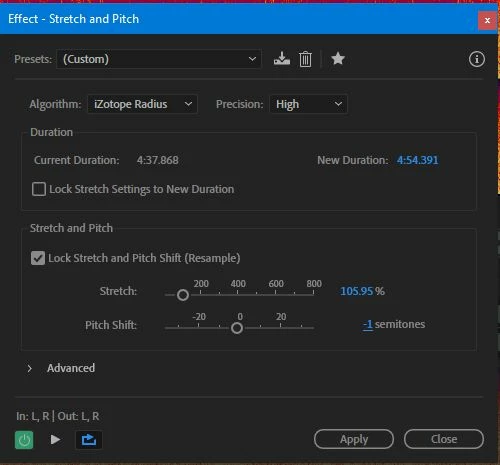
It's the Lock Stretch and Pitch (Resample) Tick Box.


Knew it would be simple, but was tearing my hair out trying to find it.


1 reply

Lab Tech DaveAuthorCorrect answer
Participant
December 15, 2022

Found It!


It's the Lock Stretch and Pitch (Resample) Tick Box.


Knew it would be simple, but was tearing my hair out trying to find it.


SteveG_AudioMasters_
Community Expert
Community Expert
December 16, 2022

Sometimes Sod's Law (aka Law of Conservation of Misery) absolutely requires that you post a question before discoveing the answer for yourself... 😉