
eunsua18168117
Participant
December 30, 2018
解決済み

In Adobe audition CC 2019, Can I send 1 track to more than 2 buses individually?

  • December 30, 2018
  • 返信数 2.
  • 3114 ビュー

Hi. I'm a CC 2019 user.

I want to know about "Send" of Adobe audition CC 2019.

Actually, there is just 1 bus I can choose per 1 track.

In multitrack display of CC 2019, Can I send 1 track to 2 buses, or more?

I want to make a parallel sending like,

               -> Bus A (some effects)          ->

Track 1                    ->                           ->          master

               -> Bus B (some effects)          ->

So individual sendings and the original sound of track are merging to master track

Not a Series sequence as Track 1 -> Bus A -> Bus B -> mater or Track 1 -> Bus A Effect 1 // Effect 2 -> master
    このトピックへの返信は締め切られました。
    解決に役立った回答 SteveG_AudioMasters_

    Perhaps a screen-grab will make this a little clearer...

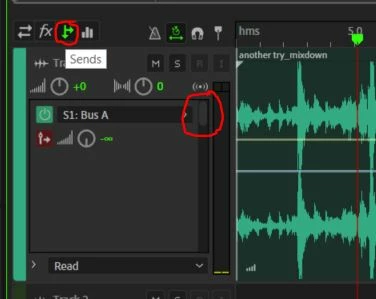
    Initially you need the 'sends' menu (small circle) and the grey slider is indicated by the larger circle. For each send, you get a pre-post fader selector (marked in red) and you can set the level. It's because of these other controls that you only get to see one send at a time.

    If you're going to use sends like this, it's often as well to remember that you can easily get fooled if you don't set the actual track output to 'none', although obviously this depends upon exactly what you're trying to achieve...

    返信数 2

    SteveG_AudioMasters_
    Community Expert
    Community Expert
    December 30, 2018

    Perhaps a screen-grab will make this a little clearer...

    Initially you need the 'sends' menu (small circle) and the grey slider is indicated by the larger circle. For each send, you get a pre-post fader selector (marked in red) and you can set the level. It's because of these other controls that you only get to see one send at a time.

    If you're going to use sends like this, it's often as well to remember that you can easily get fooled if you don't set the actual track output to 'none', although obviously this depends upon exactly what you're trying to achieve...

    eunsua18168117
    Participant
    December 30, 2018

    Why do I miss it.... Thank you!

    ryclark
    Participating Frequently
    December 30, 2018

    There are up to sixteen sends per track S1 - S16. So yes you can send any track to as many of those as you want. If you look carefully to the right of the Send box there is a scroll slider that you can click on and slide down to reveal more Sends. It is a bit difficult to see since it is dark grey in colour on a slightly darker grey background.