


In Audition, the visual meters on plugins are ahead of the audio by about half a second
I'm mixing large multitrack podcasts in Adobe Audition 2025. Lately I've encountered a weird issue that none of my coworkers with similar setups are having.
I use lots of plugins such as EQ, compression and so on. But when I'm working in a large multitrack mix (e.g. my current project has 23 tracks including 4 bus tracks) I consistently find that the visual displays for the plugins are out of sync with the audio. But it's not a lag -- the weird thing is that the visuals in the plugins are happening before they're actually being triggered by the audio.
For example, if I use a plugin like the tube-modelled compressor, the level meter on the left of the plugin screen should sync up with the audio on the track. But the levels will start moving a split second before the audio on that track starts playing. I'm attaching a screenshot to demonstrate this where you'll see the plugin is detecting a signal before the playhead has reached the audio.
The result is that it's much more difficult to use these visual displays to dial in my plugin settings. This seems to happen with all plugins regardless of manufacturer. Weirdly, the main overall level meter at the bottom of my screen does not seem to be affected.
When I'm in a very simple multitrack file, e.g. with two tracks with one audio file on each track, this issue does not happen.
So far I've tried updating the software, restarting the computer, disconnecting all external peripheral devices, and changing the I/O buffer size. Nothing seems to help.
I'm using a 2021 MacBook Pro with 64 GB Ram running OS X 15.6.
Any help would be much appreciated! 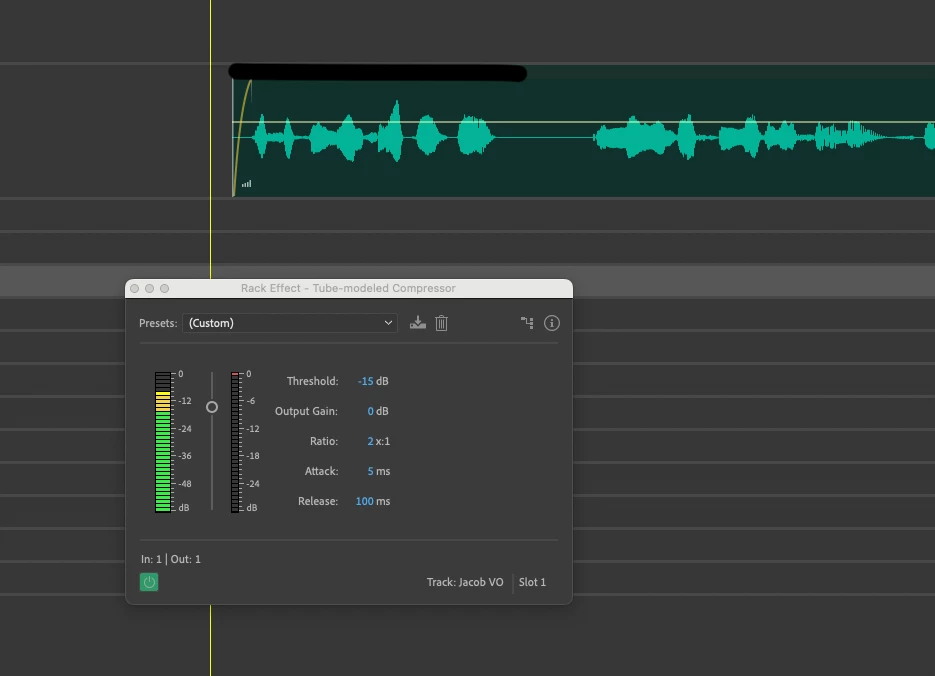


 AdChoices