Answered
In media browser - Press play without cursor?
In media browser, is there some way of playing the clip with a keyboard shortcut?
Spacebar doesn't seem to do it.
Thanks in advance.

In media browser, is there some way of playing the clip with a keyboard shortcut?
Spacebar doesn't seem to do it.
Thanks in advance.
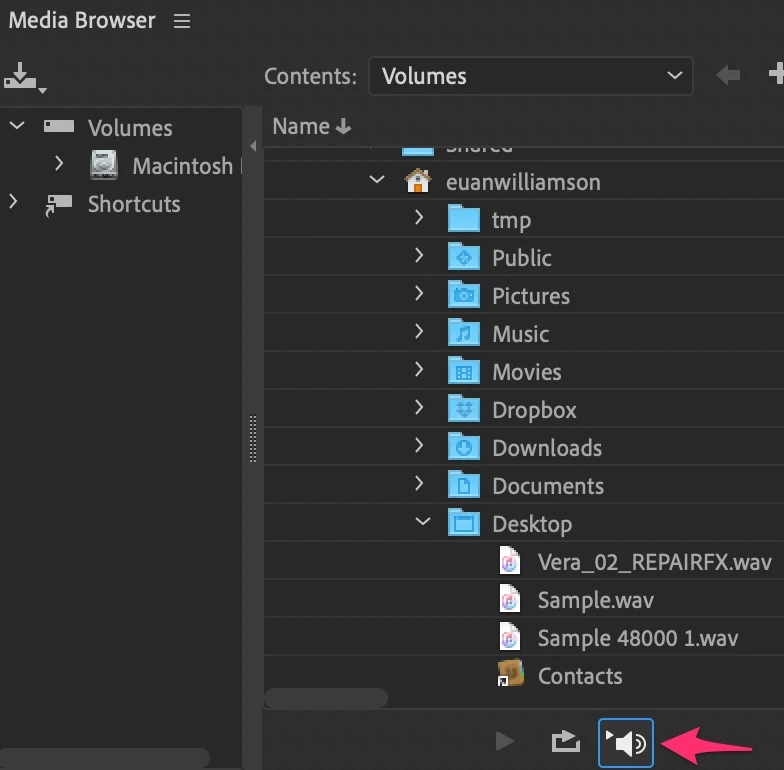
Yes, although it might not be immediately obvious and no keyboard shortcut.
I'm assuming you want a quick way to review clips in the media browser
and don't want to keep selecting and pressing the play button?
By selecting auto play as in the graphic underneath, the clip will play
when clicked on. Simply keep clicking on the next as needed to review it.
If in doubt anywhere about a control in Audition, hover your mouse over it for a tool tip 🙂
Already have an account? Login
No account yet? Create an account
Enter your E-mail address. We'll send you an e-mail with instructions to reset your password.


 AdChoices