arewenotmen
Known Participant
December 21, 2025
Answered

Is Audition incapable of multitrack editing with more than 10 tracks?

  • December 21, 2025
  • 1 reply
  • 714 views

Apologies if this has been covered before but I'm pulling my hair out here. 


I've a decent enough specced machine: AMD5950x, 128GB RAM, Win 11, 3xSSD 1xHDD, MOTU M2 Interface. Running latest version of Audition.


I produce and edit podcasts. Currently working on one which is in a radio documentary format i.e. using short clips from multiple contributors, tied together by a narration, and with music added in places.

Because the interviewees were recorded in a mix of in-person and online, audio quality varies considerably, so I want each person on their own track so I can process them individually. Clips are only 20-60 secs each.


I'm 5 mins into the first episode, have 17 tracks on the go, and whatever audio hardware settings I use (MOTU ASIO, MME etc.) even with all the effects powered off on every track, I get loads of crackling on playback. I've tried all the obvious e.g. experimenting with latency, ensuring everything is the same sample rate, etc., but I can't eliminate the terrible playback.


Mixing down all the tracks with the effects onto a single track eliminates all the crackling.


Is this just an Audition thing - that it can't handle a lot of tracks? 


Because the contents of the episode is likely to change in the reviews/amends stage, I don't really want to bounce multiple tracks into single ones in case there are changes to be made further down the line.


Can anyone shed some light, please? Thanks.

Correct answer SteveG_AudioMasters_

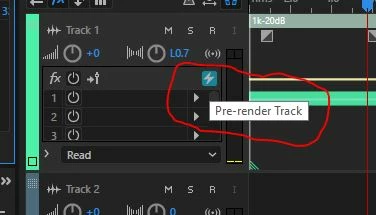
Audition can handle loads of tracks - but - if you've added effects to a track, then just powering them off doesn't reduce the processor load, I'm afraid. Fortunately for you there is a way around this, and that is to pre-render any tracks with effects  - that's what the lightning bolt at the top of the effects list is for. This will eliminate the processor overload for the track completely, and even if you wish to change something before your final mixdown, it's completely undoable.

Pre-render track.JPG

1 reply

SteveG_AudioMasters_
Community Expert
SteveG_AudioMasters_Community ExpertCorrect answer
Community Expert
December 21, 2025

Audition can handle loads of tracks - but - if you've added effects to a track, then just powering them off doesn't reduce the processor load, I'm afraid. Fortunately for you there is a way around this, and that is to pre-render any tracks with effects  - that's what the lightning bolt at the top of the effects list is for. This will eliminate the processor overload for the track completely, and even if you wish to change something before your final mixdown, it's completely undoable.

Pre-render track.JPG

arewenotmen
Known Participant
December 21, 2025

That's helpful, thanks for the reply. 

I've used Waves Clarity on a lot of the tracks which is the likely culprit. I hadn't realised that turning off all the effects racks didn't reduce the processor load - that explains a lot. 


As I've not run into this before, or rendered out effects, am I right in presuming all the effects and their settings will stay (albeit dormant), so if I choose to I can tweak them and render again?

SteveG_AudioMasters_
Community Expert
Community Expert
December 21, 2025

Yes - you can undo a render on a track at any time, redo or alter the effects, and then re-render it. There's no limit to the number of times you can do this. Effectively though, the actual effects and their settings are removed from the rendered track that you see - but as this is a non-destructive system, all these effects and settings are retained, so if you de-render the track, they are all back as you left them. Have to say that it works remarkably well, and extends considerably the number of simultaneous tracks you can run without glitches.