
Participant
January 19, 2020
Question

Is "Denoise" killing my mid range/clarity? How can I get it back?

  • January 19, 2020
  • 1 reply
  • 1188 views

Hi everyone,


I really like the Denoise effect to get rid of the background hiss/hum that's in my recording. But for some reason, after Denoise, it seems I just can't recover a natural/full quality the auido afterwards.


Here's the link to the original recording in wav, and the mp3 output after it has been processed. The only effects on this are Denoise (Processing Focus: flat), Parametric Equalizer (Vocal Enhancer), and Multiband Compressor (Pop Master). I didn't add any normalization or hard limiter at this point.
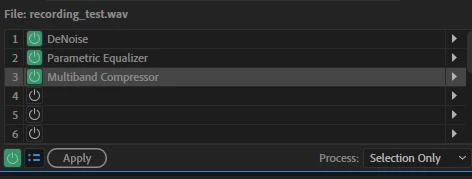


Can anyone see if there's anything particularly wrong/displeasing with the final audio output? To me, it just sounds robotic and not very natural, especially more obvious on a mobile device.


Or are there any suggestions on alternative effects to apply or maybe in a different order to get a better quality output?  I did try adding more mid-range and clarity, but it didn't really help..


Thanks.

This topic has been closed for replies.

1 reply

SteveG_AudioMasters_
Community Expert
Community Expert
January 19, 2020

You have to bear in mind that DeNoise is effectively a bit of a blunt instrument that's just about capable of running in real time, and as such, it's inevitably a bit rough around the edges. It's a tool you use if you are seriously in a hurry, and it definitely works better on some noise sources than it does on others. If you have a constant noise in the background, you are much better off using the process-based noise reduction, possibly in several small passes with different FFT sizes. This leaves fewer artifacts, and also more of your original signal remains. That's one of the issues with DeNoise - it's perfectly capable of removing what you actually want to keep, and a 'lack of clarity' is often the way that's percieved.


And once you've lost that, you won't be able to get it back again. You can't 'add clarity' as such - you can only boost some of the frequencies which constitute the area that 'clarity' comes from (around 2-6kHz) but if there are things like transients missing from that range - which there may well be with any form of real-time processing - you won't get them back, whatever you do.


But let's have a look at your recording. There are several points to note: firstly it's at a very low level - I had to add about 20dB of gain before I could play it back at a sensible level. If you have a recording like this, which requires your system gain to be turned up a lot to listen to it, then you'll also have extra system noise added to it anyway - which makes it rather harder to judge what's actually there. It's also a lousy starting point for making an MP3 from - and you lose clarity with those anyway; 'robotic' is exactly what all of the lower rates sound like!


Secondly, when I'd EQ'ed your sample to get rid of the excessive bass content (Parametric EQ, -10dB@138Hz Q=2), it became apparent that there sounds to be a lack of clarity at source, or failing that some inappropriate processing has already happened, which is what you've implied. If you really want to know what would be appropriate for your recording, we'd need an untreated sample as a wav file, attempting to tell you what was best to do is rather difficult if we have to do it through a fog of something inappropriate, if you see what I mean.


Thirdly, the background noise. This is a good candidate for using the Noise Reduction (process), as it's pretty constant. And I would attend to that carefully first - see above, and there are other more detailed posts on the forum describing the process in more detail too. But ideally, you shouldn't have to do this; it's not too difficult in most places to arrange to record less background noise than that!


Please note that ultimately, no recording is ever going to be made better in quality than its original capture. You might be able to get rid of noise, and a few speaking artifacts, but the actual quality is determined by the mic you use, and how you use it. Getting that right is fundamental to getting a good result - no amount of processing will ever do anything more than cover up these imperfections by replacing them with something that's either worse, or by making it sound 'processed' - as you've discovered.


Do you have a sample of the raw untreated recording you can post, along with some details of how you recorded it?

awerasdfAuthor
Participant
January 19, 2020

Thank you Steve. The untreated wav recording is actually in that link, you should be able to download it as a zip together with the treated mp3 file (it does say "with all these effects applied" in the recording, but the wav file has no effects applied whatsoever, sorry if that was confusing) You can disregard the mp3, that's just my attempt at processing it.


This is recorded in a very quiet room, except for the constant computer fan noise in the background. This is the microphone: https://www.amazon.com/Samson-Handheld-Microphone-Recording-Podcasting/dp/B001R747SG, with a pop filter, and a pop shield (the one that actually goes on the mic). There is no separate audio interface, so mic is directly connected to PC via USB. I'm not sure if there's any way to boost the signal on the hardware side with this setup, but even then it would boost the noise too I think. Besides I think there is enough signal-to-noise ratio in the original recording to be able to process it properly.


I understand purhasing an interface or a better mic is an automatic recommendation here, but I'm just trying to make it work with what I currently have. I suspect there's a lot more that's possible with this current hardware. I'm just not as experienced in audio processing to achieve those better (fuller/clearer) results. Hope that makes sense.


SteveG_AudioMasters_
Community Expert
Community Expert
January 19, 2020

You have to understand that there are distinct limits to what you can achieve with a pretty cheap dynamic mic plugged straight into a sound card. The mic preamps in sound cards is primarily intended to be used for communications devices, and all of them are of spectacularly poor quality - they distort quite badly. If you are going to use it at all, initially you need to take particular care with the input level setting, as per the setup page in the instructions. The Samson USB port is only 16-bit, and in your original recording the level was about 28dB below peak level - and that got your usable dynamic range down to about 11 bits (6.02dB/bit). That's somewhat worse than a good cassette recorder. It also means that some of the potentially usable signal was buried in the system noise - which in itself was added to the fan noise. None of this is a good way to proceed, and no, you haven't got enough of a signal to noise ratio unless you work the mic correctly.


Since the mic has an XLR output, you'd be better off using it, and not the internal USB port. Even a basic external sound device is going to work way better than the internal card, whatever it is, and even with that mic, it will give you better results - especially if you can record at a slightly greater distance from the computer, and with the rear of the mic facing it. That will help to minimise the pickup from it.


As I explained before, there are absolute limitations on what you can do with cheap equipment; you can't magically make something better that it inherently is, despite what they tried to claim on CSI. Clarity 'enhancement' isn't a thing - except in a very limited sense of being able to add a bit of EQ. The funamental problem is that clarity is something the mic picks up, or doesn't. Part of it is technique-based, but ultimately it's limited by the way the diaphragm in the mic responds - and dynamic mics are very good at 'smooth', but if you want real clarity you go for a condenser mic. There are good technical reasons for this, mainly revolving around the mass of the diaphragm - I won't bore you with the details unless you are desperate to know. But if clarity ain't there, you can't magic it out of nowhere - effects don't work like that.