Inspiring
July 6, 2020
解決済み

Is there a way to record audio in multitrack WITHOUT live monitoring the mic signal?

  • July 6, 2020
  • 返信数 1.
  • 1421 ビュー

Hi, I would like to hear ONLY the direct input of my mic in Audition while recording but the moment I arm the red R button, which is needed to record, I hear the software processed signal ADDED to my direct monitored mic. This makes is sound a bit phasy as it adds a tiny amount of latency. I don't understand why it's doing this. Isn't that what the orange I button is for? To turn on live monitoring? I'm keeping my "I" button OFF so why does hitting R keep enabling the processed signal to pass thru into my headphones (even if "I" is off)?


On that note, what is the purpose of the I button if its functionality of allowing the live monitoring is not independent of the R button?


PS> I'm using Focusrite Scarlett 4i4 3rd gen with latest Focusrite drivers and software.
このトピックへの返信は締め切られました。
解決に役立った回答 OrlandoJetset

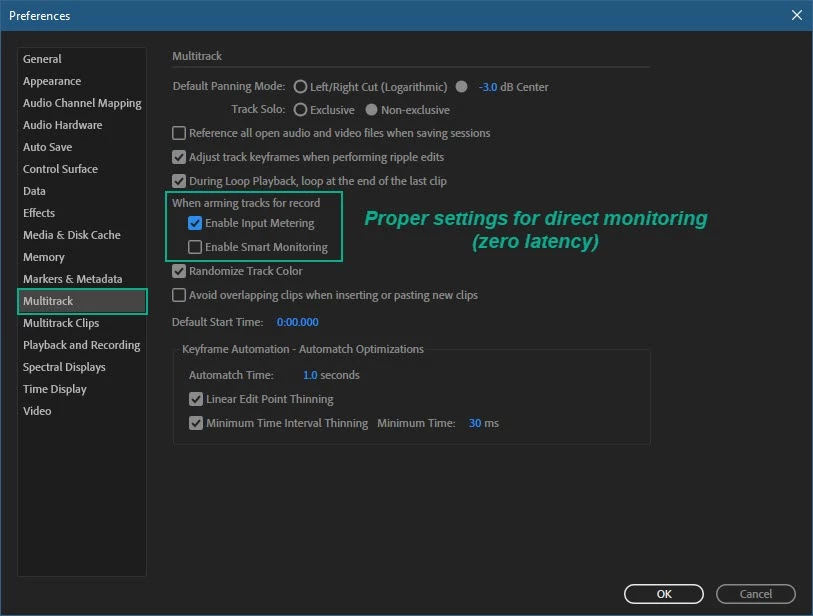
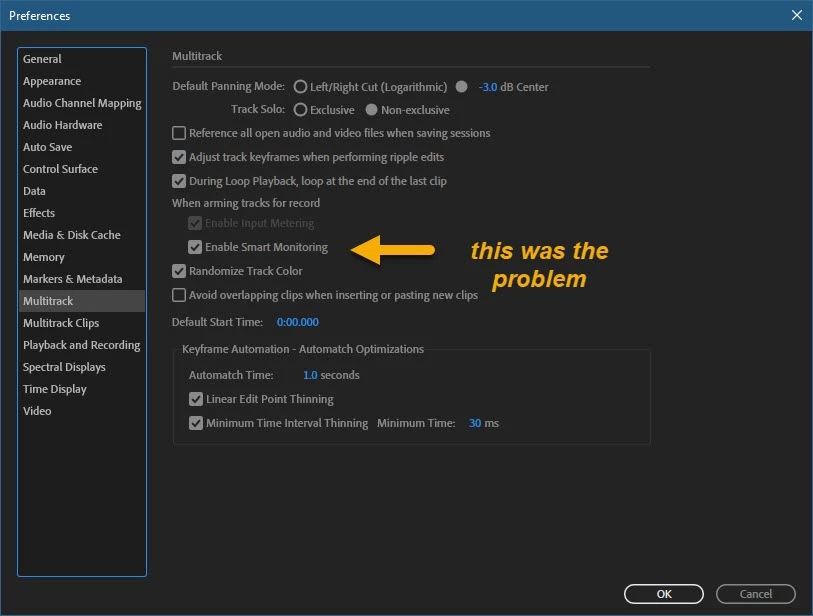
I finally solved my own issue by discovering a Preference under the Multitrack tab. I had to disable Smart Monitoring.

So happy that this worked!

返信数 1

SteveG_AudioMasters_
Community Expert
Community Expert
July 6, 2020

It's a little bit cleverer than that! By default, when you hit the R button the I will turn from grey to white (the default option, which is to let you hear the track in sync with all the rest) but if, before you start recording, you hit the R button again - or just double-click on it - it will turn the track monitoring off. Sneaky, eh?

OrlandoJetset作成者
Inspiring
July 6, 2020

That did not work. Pressed the R button to record enable - yes the I goes from grey (disabled) to white - but clicking the R button again turns it off. Also noticing that sometimes the record circle at the button seems grayed out...until I press PLAY one time, then it becomes "clickable".

Furthermore, this doesn't help me understand why there is a an orange state for the I button.

Seems like Audition is a bit complicated on what is straightforward in other DAWs...

OrlandoJetset作成者解決!
Inspiring
July 7, 2020

I finally solved my own issue by discovering a Preference under the Multitrack tab. I had to disable Smart Monitoring.

So happy that this worked!