
melbendi
Inspiring
July 28, 2018
Answered

Keep playhead within selection

  • July 28, 2018
  • 1 reply
  • 1033 views

When I play a selected area of a waveform, the playhead either continues past the end of the selection area, or if the selection is that the end of the file, the playhead jumps to the start of the file after playing.  I would like to have it loop within the selection area.  I have "Return playhead to start position" unchecked in Prefs, and also have it unchecked in the Play button menu.  Could anyone please tell me how to set this up in Audition?  Thank you for your help!
This topic has been closed for replies.
Correct answer SteveG_AudioMasters_

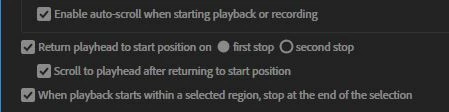
If I've understood you correctly, you need checks in all the boxes!

This will play just the selection, and return the cursor to the start of it. Yes it has to be on first stop, not second. If you select second stop, you'll end up with significantly different behaviour. If you want it to loop continuously, then you have to select the 'loop playback' option (next to the Record button) to do this - it will turn blue to remind you that it's on.

1 reply

SteveG_AudioMasters_
Community Expert
SteveG_AudioMasters_Community ExpertCorrect answer
Community Expert
July 28, 2018

If I've understood you correctly, you need checks in all the boxes!

This will play just the selection, and return the cursor to the start of it. Yes it has to be on first stop, not second. If you select second stop, you'll end up with significantly different behaviour. If you want it to loop continuously, then you have to select the 'loop playback' option (next to the Record button) to do this - it will turn blue to remind you that it's on.

melbendi
melbendiAuthor
Inspiring
July 28, 2018

Ah, I see!  Thank you, Steve!  I thought that meant the start of the file, so I made sure it was unchecked.  This will make things much easier   Thanks again!