mycc3
Known Participant
May 22, 2021
Question

latest version (Windows): playback in double speed: bug

  • May 22, 2021
  • 2 replies
  • 316 views

Hi,

a recording on my smartphone (saved as WAV) plays Audition incorrect in double-speed (Mickey Mouse voice...). Only after saving the WAV file just as WAV again with Audacity solves this issue.


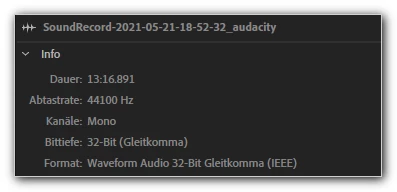
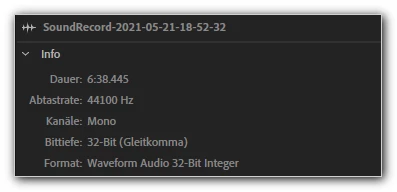
Only difference original file vs. saved file in the info tab under "Format":

Waveform Audio 32-Bit Interger vs. Waveform Audio 32-Bit Gleitkomma (IEEE)
 vs. 

Please note the correct duration of the "Gleitkomma" file, too!


Can't find any setting in the preferences, no bug fix and similar.


Thanks for helping me!

mycc

This topic has been closed for replies.

2 replies

SteveG_AudioMasters_
Community Expert
Community Expert
May 23, 2021

If you try opening a file directly in Audition in a format it doesn't understand, then that's not an Audition fault. There's a very significant difference between a 32-bit integer recording and a 32-bit Floating Point one, which Audition would understand natively. There is a means of interpreting any nonstandard file in Audition, including ones with corrupted headers, and that is to import the file as raw data (there's a menu option for this). If you'd like to upload a short file of this type here, we can have a look at it and tell you what the correct parameters for opening it are.

mycc3
mycc3Author
Known Participant
May 25, 2021

Okay, thanks for "the hint" ; ) → Importing the WAV as RAW seems to be the only solution for avoiding my workaround (via Audacity) which I described in my initial post:


Result:


SuiteSpot
Inspiring
May 23, 2021

Make sure your audio interface is set to 44.1 and/or your multitrack session in Audition (if applicable)

Bottom line is that your audio interface, Audition session and your wav should all be the same sample rate

mycc3
mycc3Author
Known Participant
May 25, 2021

I use on Android the LineageOS Recorder app, which has no settings!

Audacity, VLC and so on (Window) do not have this playback problem that only (?) occurs in Audition.

Have been using Audition for years (and CoolEdit (!) before that ...) without this problem. Seems like Audition is less tolerant of file specification in newer versions than it used to be....