

Andacar62
Known Participant
June 22, 2022
Answered

libsndfile error in latest Audition update.

  • June 22, 2022
  • 1 reply
  • 2391 views

After upgrading to Audition 22.4.0.49 today, I'm not confronted with the following error immediately on launch:
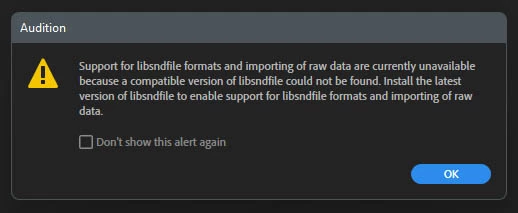
It will no longer import most file formats. Any ideas folks?

Thanks!

Correct answer SteveG_AudioMasters_

I don't know why it is doing this to you - it doesn't appear to be doing it to anybody else. Libsndfile is a C library, and can be downloaded from here (see the bottom of the page). If you run its installer and Audition still comes up with the same message, then the next thing to do is to uninstall Audition using the CCcleaner app, and reinstall it from scratch, because it should be installed with it. But as I said, we've had no more reports, so it's unlikely to be a bug.

1 reply

SteveG_AudioMasters_
Community Expert
Community Expert
June 22, 2022

Have you tried doing what the message says to do?

Andacar62
Andacar62Author
Known Participant
June 22, 2022

How? What is it? This is an error message that's short of info. And if it's something I should download from somewhere else, why isn't Adobe doing that? I spend a lot of money for this software.

SteveG_AudioMasters_
Community Expert
SteveG_AudioMasters_Community ExpertCorrect answer
Community Expert
June 22, 2022

I don't know why it is doing this to you - it doesn't appear to be doing it to anybody else. Libsndfile is a C library, and can be downloaded from here (see the bottom of the page). If you run its installer and Audition still comes up with the same message, then the next thing to do is to uninstall Audition using the CCcleaner app, and reinstall it from scratch, because it should be installed with it. But as I said, we've had no more reports, so it's unlikely to be a bug.
