
Lost all presets after resetting to default settings
Hey everyone,
I'm in a bit of a pickle. My temp folder was acting up, so I followed the advice in thread I found here on this forum that said I should reset Audition to its "vanilla preferences". So I started up Audition while holding down "shift". After I had done this Audition asked me if I wanted to reset everything to my 9.0 settings and I clicked "yes" - what I didn't know what that it removed all the new presets I had made. So now I'm in a really bad situation where tons and tons of presets are gone.
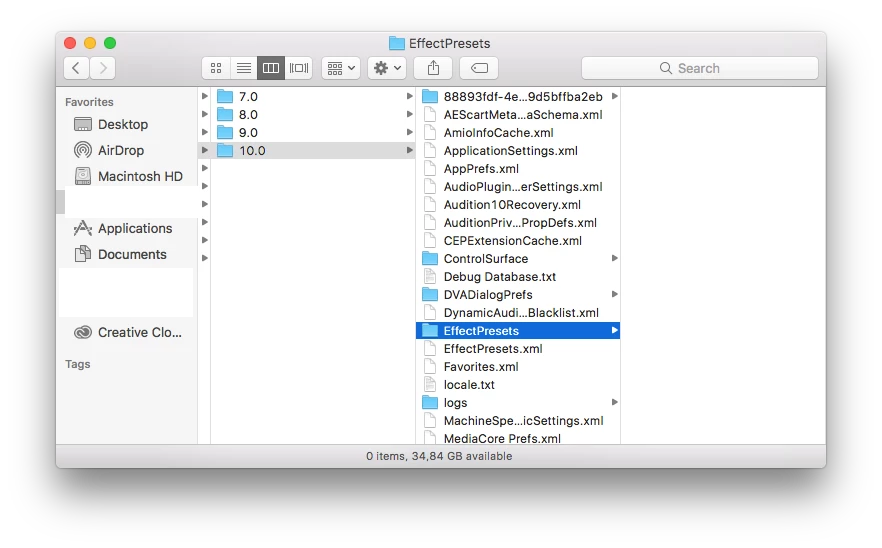
I've noticed that my Library/Preferences/Adobe/Audition/10.0 folder is still there and in that folder there is an Effect Rack folder. It's empty though but it's also empty in the 9.0, 8.0, and 7.0 folders. So I was kinda hoping that I could get Audition to look at the settings that should still be there in the 10.0 folder. I've attached a screenshot so you can see what I mean 
Does anyone know if this is possible? Or have I seriously lost all my presets? I mean, hopefully Audition doesn't overwrite files simply because you revert it to its "vanilla preferences"... right?


 AdChoices