


Known Participant
March 24, 2021
Answered

Major Bug: Edit in Audition from Premiere adds Amplify and Clip Gain to all clips.

  • March 24, 2021
  • 3 replies
  • 688 views

This issue was not present in 2019 edition.  Sending a sequence to Audition from Premiere worked fine.


Now, all clips have "Amplify" applied at 8.98 to them, as well as clip volume raised to 9dB.  (The yellow line, not the clip gain.)

Do not talk about unchecking the boxes when you send.  Been through all that.  Tested with a fresh sequence in a fresh project using only one audio clip.  Does the same thing.

Only difference I've noticed is that some files won't have the Amplify effect applied, but they'll still have clip volume raised 9dB.

This obviously somewhat breaks the functionality.
This topic has been closed for replies.
Correct answer Richard M Knight

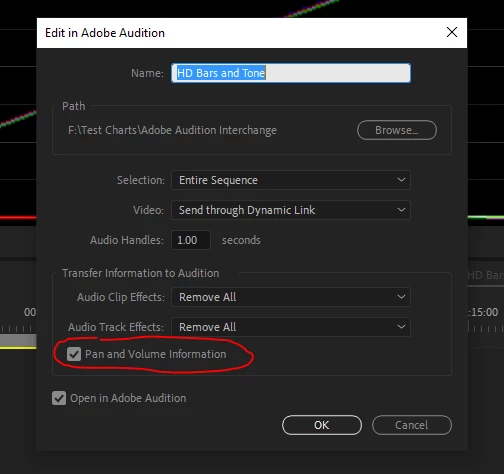
I have just tried sending a sequence from Premiere to Audition. This had the bars and tone inbuilt effect with the audio at -12db both as a stereo track and as 2 mono. I also included a Prores file with the same audio tracks and levels. The resultant file in Audition was identical to the sequence in Premiere if the Pan and Volume box was checked. If it wasn't checked the levels in Audition were all too high.


You said you have tried all the checkbox options, is there something odd with your source footage? Could you try the bars and tone effect and see if you still have the same problem.

3 replies

UK TV Professional
Inspiring
February 12, 2024

This bug is back.  I've started a new bug report post.


Simon.Is it STILL broken?
Inspiring
May 4, 2024

The bug is definitely back. I'm experiencing the same thing. 

Richard M KnightCommunity ExpertCorrect answer
Community Expert
March 25, 2021

I have just tried sending a sequence from Premiere to Audition. This had the bars and tone inbuilt effect with the audio at -12db both as a stereo track and as 2 mono. I also included a Prores file with the same audio tracks and levels. The resultant file in Audition was identical to the sequence in Premiere if the Pan and Volume box was checked. If it wasn't checked the levels in Audition were all too high.


You said you have tried all the checkbox options, is there something odd with your source footage? Could you try the bars and tone effect and see if you still have the same problem.

CyJackXAuthor
Known Participant
April 1, 2021

You know what, I perhaps was too brusque in my assumption that you would want to leave a box checked.  It seems to work.  Don't know why leaving it unchecked would leave to the issues, but there you go.

SteveG_AudioMasters_
Community Expert
Community Expert
March 24, 2021

This is almost certainly a Premiere bug, not an Audition one. You might like to post it in the Premiere forum...