
CapVideo
Participating Frequently
December 4, 2017
Answered

Markers Disappeared After Save As

  • December 4, 2017
  • 1 reply
  • 926 views

I don't know if anyone else has experienced this issue in CC, but I just lost about 30 markers from a WAV file I was working on when I did a Save As after applying an effect.  I don't recall this happening before.

I eventually resolved the issue by opening the original file, exporting the markers, then importing them into the new file - pretty clumsy.  Is this an issue with the latest CC?
This topic has been closed for replies.
Correct answer SteveG_AudioMasters_

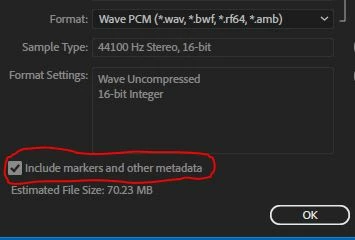
Well, I've just tried it here on the current release, and it works fine... are you absolutely sure you had a check in the 'include markers and other metadata' box?

Your only other possibility was that you weren't saving as a wav file. You can only store markers in wav files...

1 reply

SteveG_AudioMasters_
Community Expert
SteveG_AudioMasters_Community ExpertCorrect answer
Community Expert
December 4, 2017

Well, I've just tried it here on the current release, and it works fine... are you absolutely sure you had a check in the 'include markers and other metadata' box?

Your only other possibility was that you weren't saving as a wav file. You can only store markers in wav files...

CapVideo
CapVideoAuthor
Participating Frequently
December 4, 2017

Thanks for checking, Steve!

Yes, ‘include markers’ is checked, and I only edit in wav.  It must have been a momentary glitch.  I’m just glad there was a work-around!