Legend
April 29, 2020
Answered

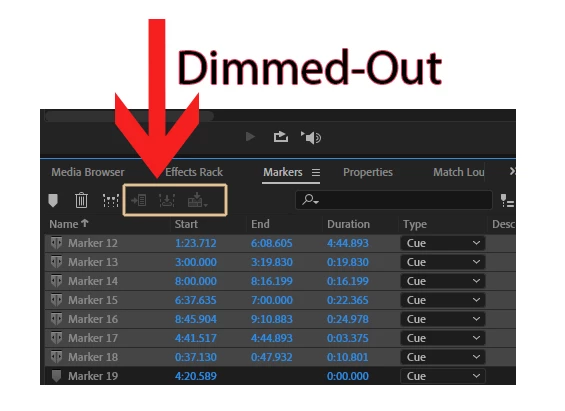
Markers Icons "Dimmed-Out"

  • April 29, 2020
  • 1 reply
  • 1146 views

Hello everyone.

I just noticed my Markers Top Icons Dimmed-Out

Here Is the Screen-Shot

Thanks.


This topic has been closed for replies.
Correct answer SteveG_AudioMasters_

Ah. They aren't options you can use in Multitrack - I should have realised when I noted that they were all export options that were missing. You have to bear in mind that Multitrack is a 'virtual' environment and that any markers you make only relate to the timeline, and not any of the audio. That's not the same as in Waveform view, where markers all relate specifically to the file you've got open. In Multitrack, those timing markers could relate to almost anything - or indeed nothing, if there's a break in the session. So there's nothing meaningful to export.

1 reply

SteveG_AudioMasters_
Community Expert
Community Expert
April 29, 2020

That is a bit odd. Is it on a Mac or a PC? I'm presuming Waveform view. I've tried several things to see if I could reproduce this, and at present I can't. Can you describe all of the steps you took with the file before this happened? It appears to be all of the options concerned with exporting from the list that are greyed out - that may be a clue, but the implications aren't obvious there. I did wonder, for instance, if this was what happens if you try to export anything from an unsaved recorded file, but it doesn't appear to be anything to do with that. If you unselect the items, do they come back?

Legend
April 29, 2020

Dear Steve G.

I am a PC User.

I noticed If I am using the MultiTrack View, Its Dimmed-Out. But, If I use the Waveform view, it is not Dimmed-Out. Why the Icons are Dimmed-Out In MultiTrack View.

Thanks.

SteveG_AudioMasters_
Community Expert
SteveG_AudioMasters_Community ExpertCorrect answer
Community Expert
April 29, 2020

Ah. They aren't options you can use in Multitrack - I should have realised when I noted that they were all export options that were missing. You have to bear in mind that Multitrack is a 'virtual' environment and that any markers you make only relate to the timeline, and not any of the audio. That's not the same as in Waveform view, where markers all relate specifically to the file you've got open. In Multitrack, those timing markers could relate to almost anything - or indeed nothing, if there's a break in the session. So there's nothing meaningful to export.
