

Question
Microphone levels inconsistent in Audition CC 2018
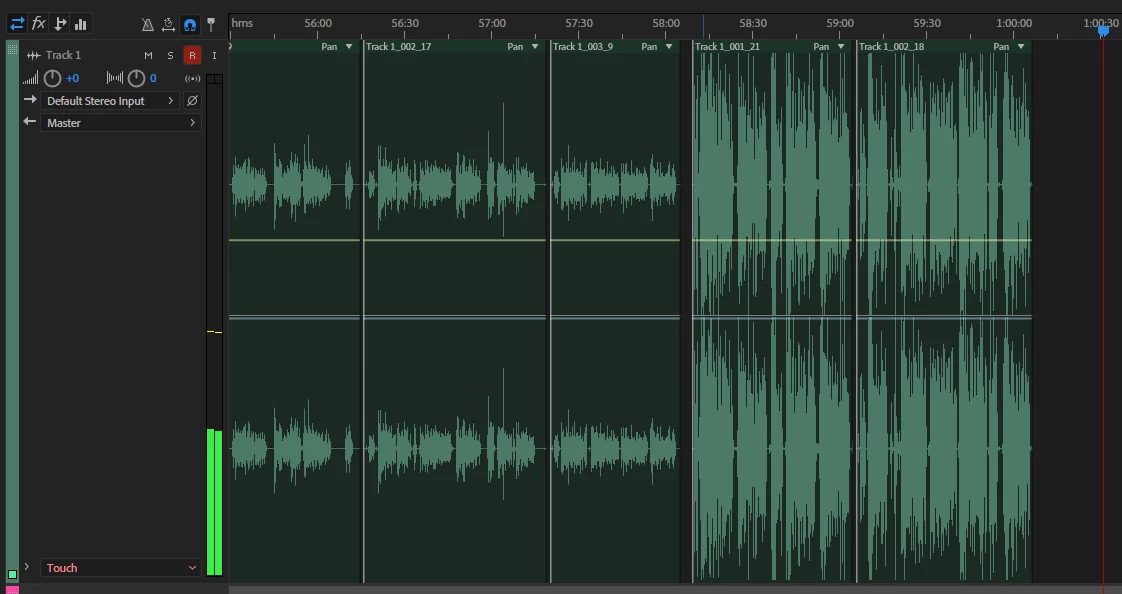
I have a setup for voiceover work. In between sessions I do not adjust my USB microphone or the project settings. In fact, I use the same project for an entire month.
Some days the microphone records at a normal level, other times it's incredibly overblown. I cannot stress that nothing changes in my setup, yet the levels are drastically different from one day to another. Can anyone enlighten me as to why this issue is happening? The microphone is the AT2020USB+ and I'm using Windows 10. The PC is reset between recording sessions, and occasionally different programs may run in the background like Premiere Pro CC2018 or Chrome, but beyond that nothing changes.
Please help! Completely lost on this one.


 AdChoices