
Participating Frequently
April 20, 2017
Question

Moving Grouped Clips after a split

  • April 20, 2017
  • 1 reply
  • 465 views

I've searched and searched and haven't found the answer to this, and I'm sure it's an easy fix (at least I hope!).

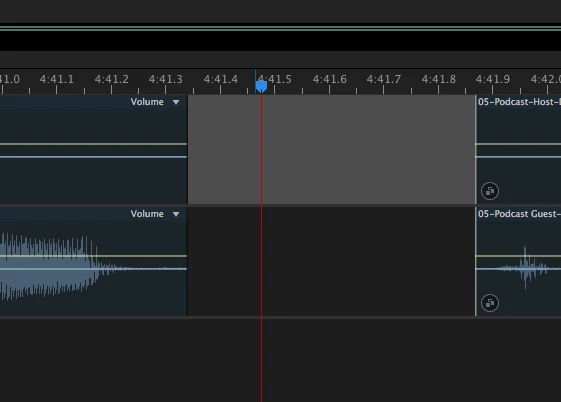
But, I'm working on editing a podcast that features a host and a guest. I've got the clips grouped in a multitrack session, but when I split them or delete a selection to get rid of a long pause, an "uhm" etc. I can't move in the second clip that is created from the split to create a crossfade, it moves everything on the track. When I delete it creates a gap that keeps me from moving the second clip independently (see image). I just want to be able to slide it over, make it overlap and keep moving. I've tried the ripple delete feature but that makes it tough if it's not a clean edit point because there is no crossfade present.

Help please and thank you!
    This topic has been closed for replies.

    1 reply

    Participating Frequently
    April 20, 2017

    I should point out that an ungrouped clip behaves exactly how I would expect it to. I can split it and then shift it around, crossfade it with the previous track etc. it's completely and freely movable. Once I group the clip with a clip on another track I can no longer do that, they snap to either the gap created or the clip before it (if I use the Ripple Delete function). PLEASE tell me there's a way I can do this, it is by far my most used technique while editing podcasts, and I perform it dozens upon dozens of times during an editing session!!

    Thanks in advance.

    ryclark
    Participating Frequently
    April 20, 2017

    Which version of Audition are you using? Splitting works OK here with Grouped clips as it turns the second part of the clips into a new group that can be moved and overlapped with the remains of the original group. However this doesn't work with Time or Ripple Delete since the two halves remain linked as one group, albeit with a gap, and can't be moved separately.

    What you could really do with for ease of editing this way is an all in one Split Ripple Delete action that will act like both a Split and a Ripple Delete at the same time. May be add it as a feature request.

    Participating Frequently
    April 20, 2017

    Thanks, I'm using the Creatice Cloud, I'll try it using the split function, but I'm pretty sure I had the same issue.

    Thanks again!