
Inspiring
June 27, 2018
Answered

Moving multiple clips in the multitrack unsyncs them

  • June 27, 2018
  • 1 reply
  • 395 views

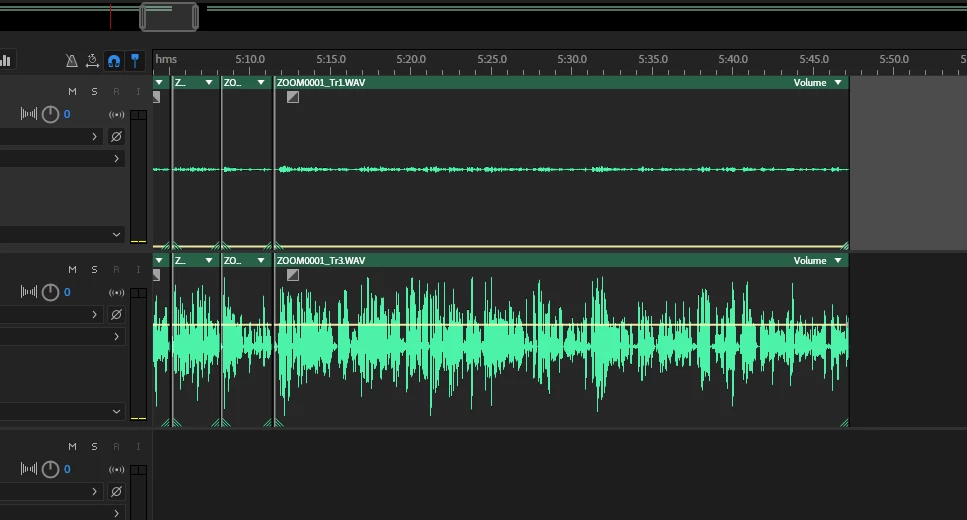
I have a group of clips on two tracks that I want to move within the multitrack view. They move as a whole, but unsync from one another when snapping to other clips. These have all been razored collectively, there is no reason for them to not snap together. Turning off snap to ruler helps a bit, but it still doesn't work. Why is this a feature and how do I turn it off?

Grouping doesn't help. It should, but it doesn't. The top clip seems to snap correctly, but then the bottom one is still free-floating.
This topic has been closed for replies.
Correct answer ryclark

This is a possibly known bug. See this earlier thread Moving multiple tracks do not stay in sync!

1 reply

Inspiring
June 27, 2018

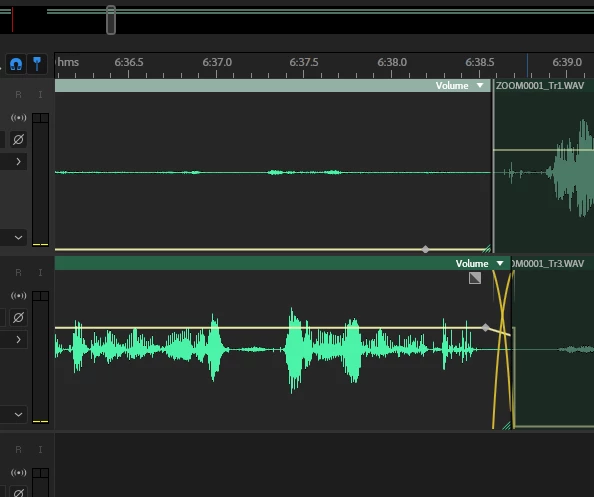
Mid-move screenshot. This is with only snap to clips and snap to loops selected. Look at the offsets in the top clips, why is that happening? It's inserted a crossfade and silence

ryclark
ryclarkCorrect answer
Participating Frequently
June 27, 2018

This is a possibly known bug. See this earlier thread Moving multiple tracks do not stay in sync!

Inspiring
June 27, 2018

Thanks. I feel like it's something that needs a very urgent fix