


Participant
September 19, 2018
Answered

Moving multiple clips, within multiple tracks at the same time

  • September 19, 2018
  • 1 reply
  • 3321 views

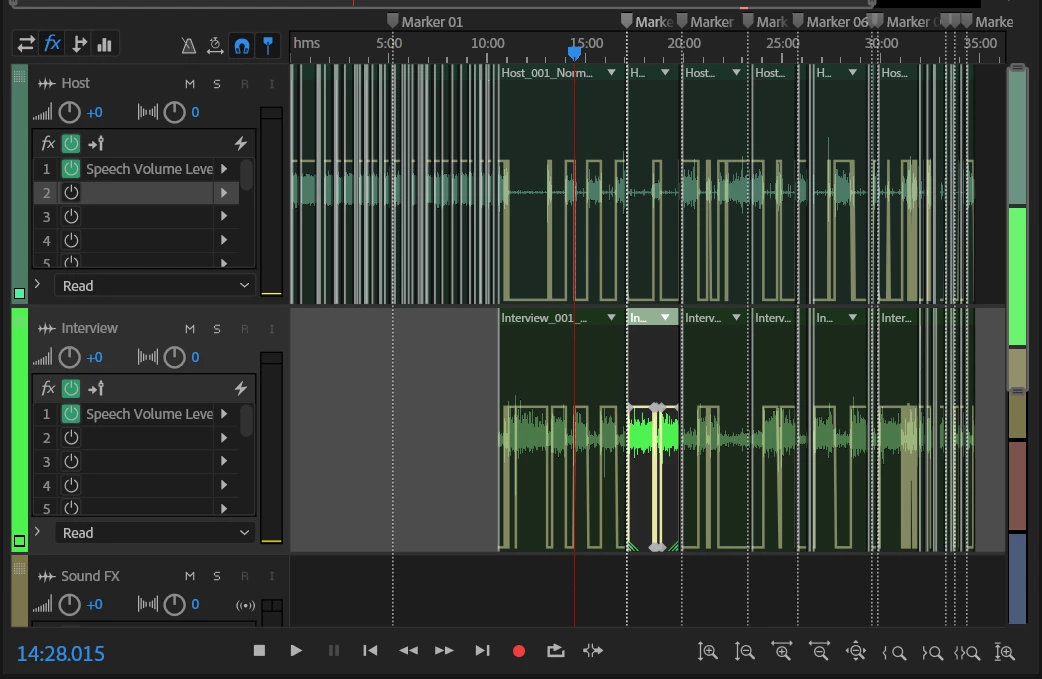
I'm trying to figure out how move multiple clips, over two tracks, to the right in the timeline, while keeping the work I've done in sync.

In the image you'll see where I am currently at, how do I move all that work back, so it starts at the five minute mark, instead of starting at the beginning? I want to put some other things at the beginning of the project. I know how to select all the clips, but I can't figure out how to move them all simultaneously. My move tool doesn't move all of them. I just cant seem to figure it out.

Any help would be appreciated. Thank you.
    This topic has been closed for replies.
    Correct answer SuiteSpot

    Select all the clips and then group them and then you can move them all

    Ctrl A and then Ctrl G

    1 reply

    SuiteSpot
    SuiteSpotCorrect answer
    Inspiring
    September 19, 2018

    Select all the clips and then group them and then you can move them all

    Ctrl A and then Ctrl G

    ryclark
    Participating Frequently
    September 19, 2018

    Alternatively since you want to move the clips in order to get 5 mins of spare space at the start of the session you could select both sets of clips, return the cursor to the beginning, using the Home keyboard shortcut, and then insert 5 mins of Silence from Edit/Insert/Silence menu instead.