
allington76
Participant
April 2, 2019
Answered

Multi-track hide and seek

  • April 2, 2019
  • 1 reply
  • 655 views

Hello all,

Does anyone know how to control where files are placed when you add them to a multitrack session?

As it stands, every time I insert a file into a multitrack session, Audition places the file in some random spot and I have to spend time looking for it.  It's usually placed way at the end of the session, which means lots of zooming out and back in.

Does anyone have a solution for this?

Many thanks!
This topic has been closed for replies.
Correct answer SteveG_AudioMasters_

allington76  wrote

Does anyone have a solution for this?

Under normal circumstances, clips get placed where the CTI is, and on any track that's highlighted. But if you have clips recorded with timecode stamps on them (a lot of portable recorders do this) then they will be placed at the point the timecode indicates - which could indeed be hours into the track.

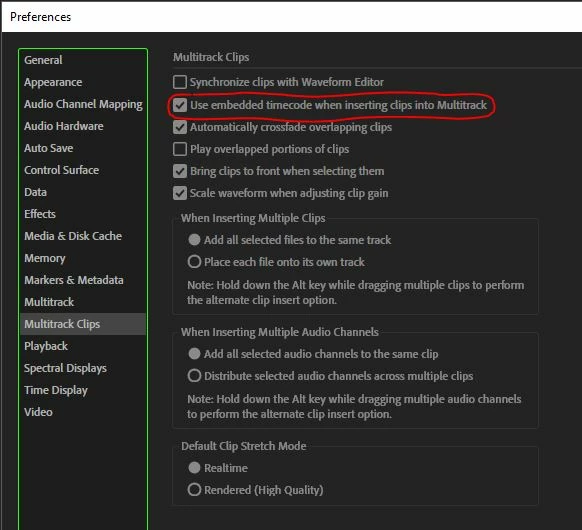
Fortunately for you, if this is the case, you can easily stop that happening. Take the check out of the box I've indicated, and then normal positioning rules will apply:

1 reply

SteveG_AudioMasters_
Community Expert
SteveG_AudioMasters_Community ExpertCorrect answer
Community Expert
April 2, 2019

allington76  wrote

Does anyone have a solution for this?

Under normal circumstances, clips get placed where the CTI is, and on any track that's highlighted. But if you have clips recorded with timecode stamps on them (a lot of portable recorders do this) then they will be placed at the point the timecode indicates - which could indeed be hours into the track.

Fortunately for you, if this is the case, you can easily stop that happening. Take the check out of the box I've indicated, and then normal positioning rules will apply:

allington76
Participant
April 2, 2019

Yes!  Thank you, Steve!