
IgF
Known Participant
January 8, 2019
Answered

Multitrack arm for record greyed out in all tracks

  • January 8, 2019
  • 3 replies
  • 31154 views

I'm recording Multitrack sessions on Audition CC2018 and from being fine in one session, suddenly all the "arm for record" buttons appeared greyed out in all tracks when I opened a different session - and now the problem is there in all sessions. It won't allow me to arm any tracks to record on them - I can do everything else, but not record.

The microphone works fine and I can record in "Waveform" mode - but not in a Multitrack session.

I have tried the usual re-starting computer, etc, but the problem persists. Please help!

UPDATE:

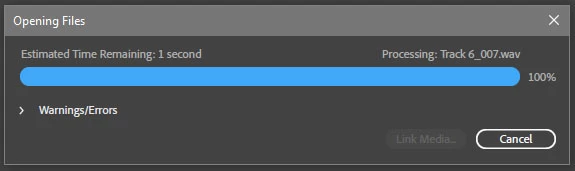
If I create a new empty Multitrack session, that new session works fine. If I open an already created session which already has recorded audio files in it, then  sometimes it works fine, most times it does not - I have not been able to find a pattern (some were recorded some time ago, some are new). In the sessions that have the problem this window (which I had never noticed before) appears while the session is loading:
Also, If I create a new Multitrack session while I have a problem session open, the new empty session works fine and when I switch back to the problem session the arm to record buttons are available and work fine - but not always; sometimes this works, sometimes it doesn't.
Correct answer SteveG_AudioMasters_

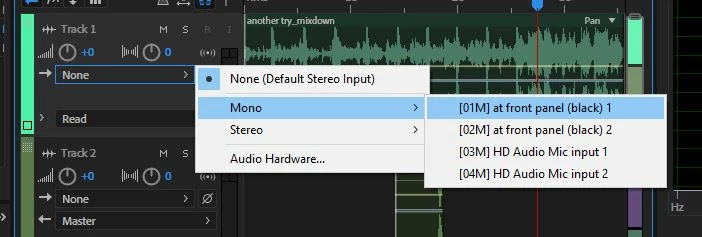
Chances are that you've deselected any available input from the tracks you are trying to record on - this is saved as a part of the session file, so will vary from session to session:

Without a suitable input, the Record button is indeed greyed out.

3 replies

Participant
August 30, 2020

I have the same problem. But I can't even see the pull down menu for selecting the inputs. I went to preferences and the correct inputs are selected on preferences. I just can't arm record!

SteveG_AudioMasters_
Community Expert
Community Expert
August 30, 2020

The menus are selected at the top of the track controls, and are global. It's the one on the left that's green:

Known Participant
January 1, 2021

This partly fixes my problem.  Found the double arrow thing and turned it on.  Two of my twenty tracks then show the inout output options and indeed somehow set to "none" (I did not).  


But the other tracks--which used to allow record to be armed...still grayed out...still not showing in out options.


Any other settings to try?  I tried creating new stereo audio or 5.1 audio tracks still grayed out no in out options.  


Participant
September 28, 2019

I am having the same problem, only it goes one step further. The "input" option in a multitrack session also doesn't work. I can access and record in a single track session with my mic, but the option to choose the input (the button is there and clickable but no dropdown happens) doesn't work so I also cannot arm to record. I am frustrated and hoping someone knows what I've done.

SteveG_AudioMasters_
Community Expert
SteveG_AudioMasters_Community ExpertCorrect answer
Community Expert
January 8, 2019

Chances are that you've deselected any available input from the tracks you are trying to record on - this is saved as a part of the session file, so will vary from session to session:

Without a suitable input, the Record button is indeed greyed out.

IgF
IgFAuthor
Known Participant
January 9, 2019

Thanks SteveG!

Yes, all tracks have "None" as input, and manually switching them to an input enables track recording.

I still don't know how it happened, though: normally all my track inputs appear as "Default Stereo Input" and I never touch individual track inputs but set my input (which is always the same) in Preferences/Audio Hardware/Default Input. Any idea why it has gone from "Default Stereo Input" to "None" in some sessions? I could have switched it accidentally in the last session I worked on, but the problem appears in sessions that have not been worked on for months. In any case I can continue working by switching track input manually, so thanks again.