
Participant
March 22, 2018
Answered

Multitrack export time selection default settings

  • March 22, 2018
  • 1 reply
  • 380 views

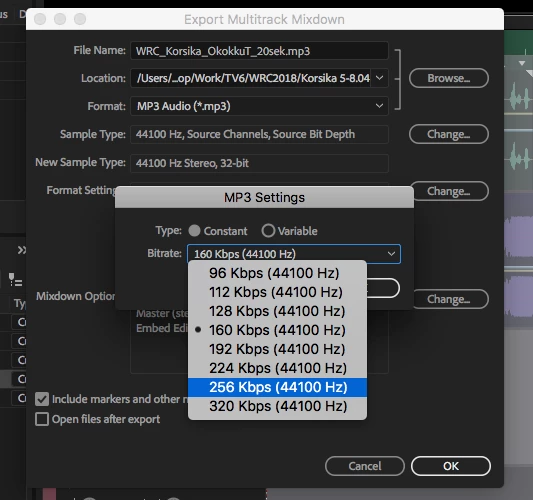
I'm not able to figure out how to set the default mp3 export settings for multitrack time selection.

The default while exporting is mp3 but I constantly have to change the format settings from 160 to 320 kbps.

Is there a way to change it?

I need to make two extra clicks on every export.

I have searched the web and forums and have not found a solution for it so far.
    This topic has been closed for replies.
    Correct answer priitr80380475

    Thanks for the reply!

    This is a Mac.

    Well when I'm in Multitrack and choose "save as" it offers to save the work file not the mp3.

    My thought is the same that it should remember the last settings I used for export but it does not.

    But just now I figured it out how the settings will save.

    You have to use Waveform editor and use "save as" and set the mp3 to 320.

    And after that it will become the default for exporting. (Also in Export - Multitrack Mixdown - Time Selection export)

    Case closed and two additional clicks less for the rest of my life

    Thanks for the guidelines!

    1 reply

    SteveG_AudioMasters_
    Community Expert
    Community Expert
    March 22, 2018

    What is supposed to happen (and indeed does here) is that 'save as' should remember the last settings you had for MP3, and use this as the new default. I've tried this with both exporting and 'save as' and it appears to be working, either way. Is this on a Mac or a PC?

    priitr80380475AuthorCorrect answer
    Participant
    March 22, 2018

    Thanks for the reply!

    This is a Mac.

    Well when I'm in Multitrack and choose "save as" it offers to save the work file not the mp3.

    My thought is the same that it should remember the last settings I used for export but it does not.

    But just now I figured it out how the settings will save.

    You have to use Waveform editor and use "save as" and set the mp3 to 320.

    And after that it will become the default for exporting. (Also in Export - Multitrack Mixdown - Time Selection export)

    Case closed and two additional clicks less for the rest of my life

    Thanks for the guidelines!