


Participant
April 23, 2024
Question

Multitrack mixdown does absolutely nothing, does not work at all.

  • April 23, 2024
  • 1 reply
  • 393 views

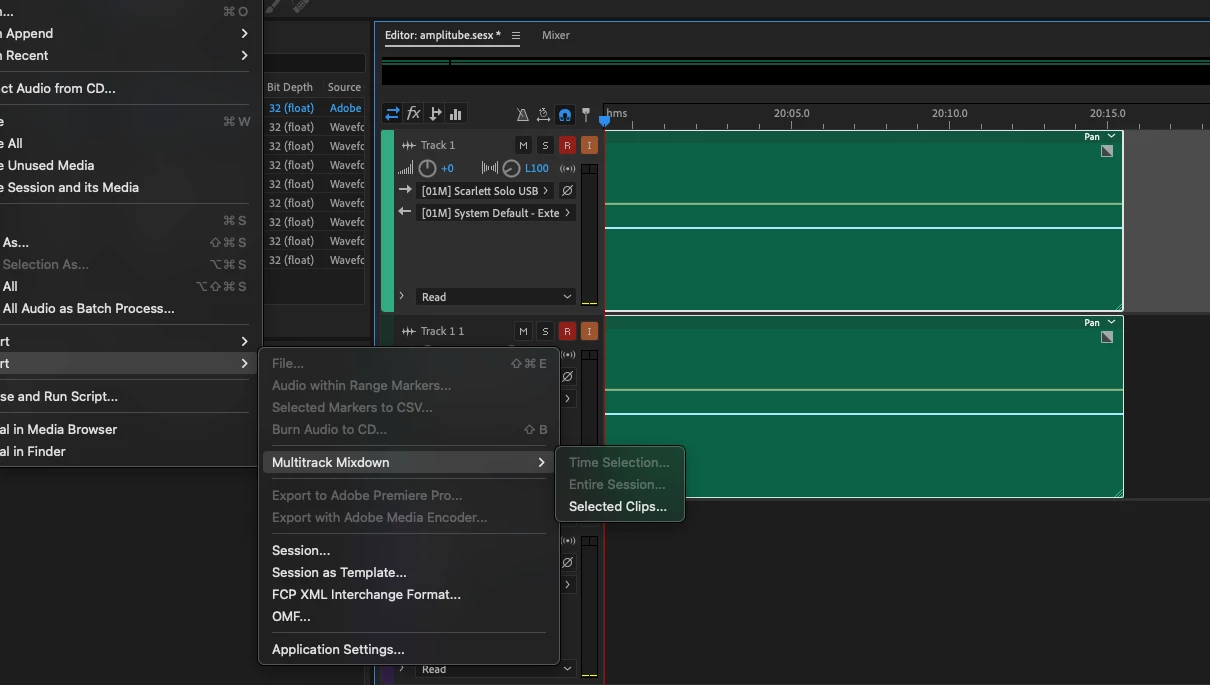
I select clips, do export > multitrack mixdown > save.

Nothing happens

No file is created. FIle is not opened, obviously. Window closes, nothing happens.

Why? How  do I make it work?
1 reply

SteveG_AudioMasters_
Community Expert
Community Expert
April 23, 2024

Take out the record-ready and orange monitor indicator tabs on your tracks, and most importantly, route the output of them to the Master or Mix (could be either, depending upon what template, if any, you used) channel, not the system default output. If you don't do that, your tracks won't mix down.

Participant
April 24, 2024

Changing output to mixed worked. But why do they let you do that... if it doesn't work. smh Adobe

SteveG_AudioMasters_
Community Expert
Community Expert
April 24, 2024

Why? Because it's a flexible system that has other uses besides mixing down. The routing does exactly what it says it's going to - so if you route a track to an output, that's exactly where it sends it. If it sent it to the mixer output as well, often you'd end up with loads of mixed files you didn't want or need. It's very flexible, but you do have to keep an eye on what you are doing!