
Multitrack Volume Control
MacOS Monterey, Audition 24.0.3.3
I've just begun editing podcast episodes in audition as it is the easiet option in my employers workflow. I wanted to know if there is a better way to adjust the volume in specific selections in the multitrack view?
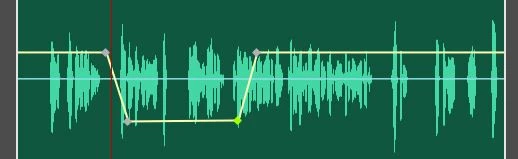
In the waveform view I can make a selection and adjust the gain, great, but there is no gain line (is there a way to enable one?), it is destructive and difficult to change later if needed. In multitrack I can do pretty much the same thing but I have to right click and use "silence selection" command. It adds a nice little dip in the gain line that shows me where I've changed the volume, but it makes really ridiculous keyframe lines if you don't drag your mouse perfecly straight and you have to fiddle with it back and forth to keep it flat.
That is the only way I've figured out how to do that in multitrack, I think it would be great to be able to just drag the gain line in the clip and it ajdust the volume where selected. Am I missing a short cut that allows me to do that? I can't find a clear answer anywhere else.
--Thanks


 AdChoices