
fmaudio7
Participating Frequently
June 18, 2020
Question

New adobe audition 2020 update not saving files in external folders

  • June 18, 2020
  • 3 replies
  • 1181 views

Every time I save a session I get a warning window
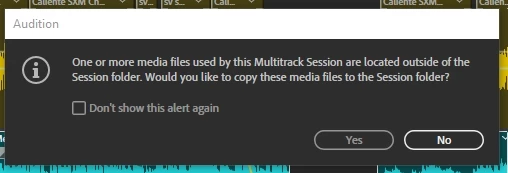
Even if I click "Yes" the session  shows the clips as "off line" It started happening with the new update and I don't know how to avoid it, need help. I already look in preferences and I can't fix it.

Thank you

This topic has been closed for replies.

3 replies

Adobe Employee
June 26, 2020

Thanks for the report. This will be fixed in the next release of Au. There should also be a public Beta of Au within the next few days that contains the fix as well. I’ll update this thread once that public Beta is available. 

Adobe Employee
June 26, 2020

Au 13.0.9.1 public Beta build is now available in the Beta apps section of the CC desktop application.  This build contains the fix for this bug. Thanks!

Legend
June 26, 2020

Just to add a little more to this discussion thread...


Running AA 13.0.78, I've just completed the first "draft" of a podcast consisting of three spoken word clips and three music clips.  The spoken word clips were originally one file, "cut" into clips using highlight each clip and use f8 to mark it, then "Insert into multitrack".

The music tracks were similar clips, two taken from one file and the third from another, each of these files being a church service, so extracting specific music items, again created via the highlight...f8 method.

I inserted the speech clips to Track 1 of the multitrack, between the music clips (which were on Track 2) and almost instantly one of the speech clips went "offline".  (If I remember correctly, simply scrolling through the timeline provoked the "offline problem".)  It was quite easy to replace the offline clip with another copy of it (?apparently no method to "force" a relink to the original clip?) and then delete the "original" (offline) clip from the multitrack.


So far so good.  Except that the Files panel now shows two copies of the same speech file, not sure why?  I think the presence of these two in the list may be causing AA to throw the same error message as the OP gives, every time I need to save the project, even though ALL the media files ARE in the "Imported Files" folder already.  I tend to click "Yes", in an attempt to stop AA throwing the error message even though I know the specific file is in that folder (I did check!), but the "error message" keeps appearing.


Am I doing something obviously wrong, or is this an AA anomaly?

SteveG_AudioMasters_
Community Expert
Community Expert
June 26, 2020

There is definitely something going on with this 'clips off line' business - a lot of people have now reported anomalies with it since the last upgrade. I'm pretty sure that the devs know about it, and if there's anything to be said I'll report back.

SteveG_AudioMasters_
Community Expert
Community Expert
June 18, 2020

Shouldn't happen - but... even though you've stored a copy of the file in the session folder, that doesn't mean that it's the file that the session is using. If you keep the files you are actually using in the session folder and replace the external ones with those, it ought to work fine when you re-open it. Report back if it doesn't...

fmaudio7
fmaudio7Author
Participating Frequently
June 26, 2020

Thank you