
New AmioWavPack Plugin (lossless audio files)
I have just completed a brand new version of the AmioWavpack plugin (along with the release of WavPack 5.0.0), and I thought I'd share it here. It's free and open-source.
This plugin allow you to load and save WavPack files in Audition. WavPack is a lossless audio format just like the out-of-the-box supported formats FLAC and Monkey's Audio, but it offers some important advantages for Audition users. Specifically:
- Handles 32-bit float audio (same format that Audition uses natively)
- Handles any multichannel file Audition can work with (including all the channel identities)
- Saves all the Audition metadata allowed in WAV files (cues, markers, etc.)
- Support for "realtime" mode so you don't have to wait for a file scan every load
- Retains WavPack metadata (like "artist", "title", and cover art in APEv2 tags)
- Unlimited file size (no 2GB limit)
- Fast operation
This plugin has an all-new Settings Dialog so you can try out some of the advanced WavPack features.
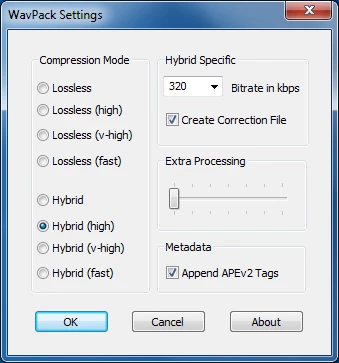
The easiest place to get the plugin is on the WavPack downloads page or the GitHub release page:
http://www.wavpack.com/downloads.html
https://github.com/dbry/amioWavpack/releases
If the links don't work, just Google "AmioWavPack" and you'll find it. Be sure to download the right one for your version of Audition (32-bit or 64-bit).
Cheers!


 AdChoices