Answered
New Favorites won't apply
When I am making a new favorite list for some effects, it won't apply again to all waveform. It's applied only to a specific part of the waveform not all of it.
I'm so upset can someone help please.

When I am making a new favorite list for some effects, it won't apply again to all waveform. It's applied only to a specific part of the waveform not all of it.
I'm so upset can someone help please.
Setting up and editing Favorites can be a real pain, as the one thing you can't edit is the time values - you have to plan very carefully in advance what you are trying to achieve, and some things simply aren't possible - like anything to do with file handling.
The clue to getting effects to apply to the whole of any waveform is to make sure that you've selected the whole of a waveform as the first step in creating the Favorite. Then apply whatever effects it is, stop recording, save the result, and then select Edit Favorite. What you need to do then is expand the screen sideways to reveal the bits you can edit. What you are looking for is this:

You need to make sure that each step is applied relatively, and that the start and end are 0% and 100% respectively. If you do that, your preset will work on whatever selection you've made. And if you don't make a selection at all, it will apply to your entire file. You have to make sure that this applies to all of the steps though, otherwise chaos will ensue!
You have to experiment a bit with this to see what happens, if you want to get the best out of it though. For instance, you can create a preset to apply a fixed amount of silence at the start and finish of a file by taking advantage of the fact that the Insert Silence function in the Edit menu can and indeed must have times preset into it - and no they don't even have to be the same time for the start and the finish. This uses the other approach to a favorite, where you've set it so that it can only work from the start and end of a file:
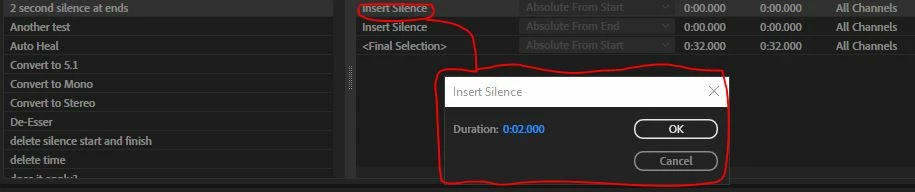
So to edit the times, you click on the effect in the list, as illustrated above.
But don't get upset - just do experiments!
Already have an account? Login
No account yet? Create an account
Enter your E-mail address. We'll send you an e-mail with instructions to reset your password.


 AdChoices