
Inspiring
March 4, 2021
Answered

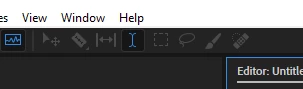
New file, Edit icons near Multitrack switcher all disabled.
  • March 4, 2021
  • 1 reply
  • 161 views

The audio I am editing is from a video however, I have exported the audio out separately.

First time I have come across this in Audition, idk what I could be doing that would disable the bar.

I literally just opened it.

This topic has been closed for replies.
Correct answer SteveG_AudioMasters_

Your file has opened in Waveform view, so what you have displayed is perfectly correct; the rest of the tools only work in Multitrack view - although the ones to the right of the Time Selection tood are active for spectral editing.

1 reply

SteveG_AudioMasters_
Community Expert
SteveG_AudioMasters_Community ExpertCorrect answer
Community Expert
March 4, 2021

Your file has opened in Waveform view, so what you have displayed is perfectly correct; the rest of the tools only work in Multitrack view - although the ones to the right of the Time Selection tood are active for spectral editing.