


Participant
June 18, 2025
Answered

Newbie help: Exported tracks having limited waveforms

  • June 18, 2025
  • 1 reply
  • 176 views

Hi everyone... I am looking to finally transition to Adobe Audition after using Cool Edit for decades.


I tried playing around with a bit of mastering today, but found that my exported tracks seemed to have compressed the waveform a little.  Sorry if my explanations are poor, but hopefully this pic will demonstrate what I'm talking about.
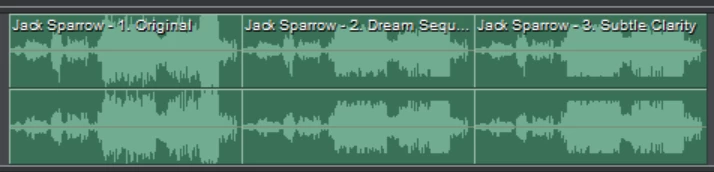
 

You can see the original version of the left, and then my two Audition exports on the right, which look considerably 'smaller' in its waveform range.


Is there a default setting or something that would force this?


Thanks in advance for any and all assistance!

- Ryan.

Correct answer ryan_8981

Thank you... relaunched and had another crack at it later and they came out fine that time.  Perhaps I clicked something I shouldn't have on the first attempt.  

1 reply

SteveG_AudioMasters_
Community Expert
Community Expert
June 18, 2025

Without knowing exactly what you did, it's rather hard to say what caused the level shift from what looks like an overpeaking waveform to a relatively normal one... and also there's no scaling whatsoever. But a lot of mastering apps will compress the output anyway - it tends to 'smooth' the levels out a bit, supposedly making it easier to listen to them.

ryan_8981AuthorCorrect answer
Participant
June 18, 2025

Thank you... relaunched and had another crack at it later and they came out fine that time.  Perhaps I clicked something I shouldn't have on the first attempt.