
jusalsol
Participant
July 10, 2019
Question

No aparece la opción para agregar efectos ni hacer envíos

  • July 10, 2019
  • 1 reply
  • 639 views

Hola, estoy frustrado.

Llevo horas intentando saber cómo hacer para que me aparezca la opción de agregar efectos sin necesidad de abrir el bastidor de efectos.

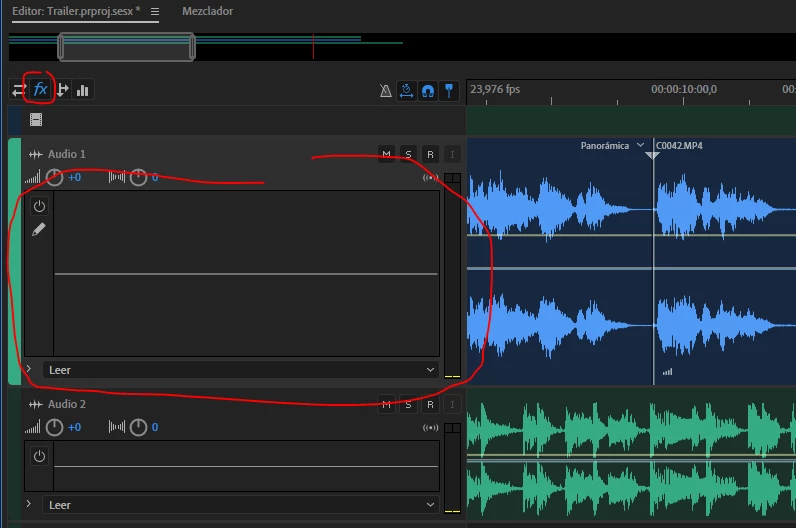
Como pueden ver sólo me da la opción de ecualizar, por más que doy clic en Fx o en Envío, sólo me aparece para ecualizar, adjunto la imagen.
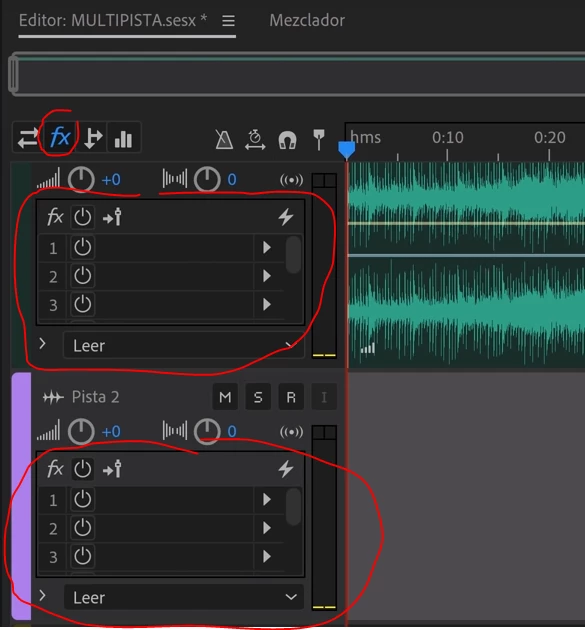
Me encantaría que apereciera así, con la opción para agregar efectos sin tener que abrir el bastidor de efectos:
Tengo la versión más actualizada del Audition 2019. acabo de actualizarlo hoy 10 de Julio de 2019.

Por favor, ayuda.

This topic has been closed for replies.

1 reply

ryclark
Participating Frequently
July 10, 2019

That is very strange. It should change as you want when you click on the different icons at the top with the correct active one showing blue. Are you running Audition on a Mac or a PC? It all works OK as it should here on a Win10 PC.

Eso es muy extraño. Debe cambiar como desee al hacer clic en los diferentes iconos en la parte superior con el activo correcto que se muestra azul. ¿Estás ejecutando Audition en un Mac o PC? Todo funciona bien como debería aquí en un PC Win10.

jusalsol
jusalsolAuthor
Participant
July 10, 2019

I'm running it on a PC yeah I know it's weird. And I don't know why this happen. I just want to imagine it's an Adobe's mistake. Because I've looked for in Audition's settings and I couldn't find anything.

Thanks for replying. I'm open at any solution. Thanks.

ryclark
Participating Frequently
July 10, 2019

Only possible explanation might be that you are running the Spanish localised version of Audition. We did have one Japanese user who had similar problems with selecting the same track icons. never got to the bottom of that either. If you are running the Spanish version is it possible to install the English version instead to see if your PC gives the same bug with that version. If we can tie it down to different language versions then he bug can be passed on to the Developers to investigate.

If you move to the Mixer view you should be able to see all the Routing, FX, Sends and EQ as separate selections on each Tracks in line channel.