Participant
November 24, 2023
Answered

No puedo editar ningun archivo en Audition

  • November 24, 2023
  • 2 replies
  • 586 views

No sé qué ocurre con Audition, pero no puedo usar las herramientas comunes para editar mis archivos. He intentado diversas formas, pero el programa suspende la opción de seleccionar cualquier herramienta diferente a Selección de Tiempo. 

This topic has been closed for replies.
Correct answer SteveG_AudioMasters_

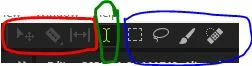
The tools in red only work in multitrack - they are Move, Razor and Slip

The green tool is the Time Selection tool, and only works in Waveform view, and selects sections of the waveform

The blue tools only work in the spectral view (under the waveform). They are the Marquee, Lasso, Paintbrush and Spot Healing Brush.


They are all working correctly.

2 replies

SteveG_AudioMasters_
Community Expert
Community Expert
November 24, 2023

Nothing is wrong with Audition in this regard - it's just that you can't use all the tools in both Waveform and Multitrack views - the ones you can't use in either view are greyed out.

FranctiAuthor
Participant
November 24, 2023

Hey Steve.

I think that Audition should let me use some tools like the cutter. I understand that some tools don't work in Multitrack views, but even I tried in the Waveform.

SteveG_AudioMasters_
Community Expert
SteveG_AudioMasters_Community ExpertCorrect answer
Community Expert
November 24, 2023

The tools in red only work in multitrack - they are Move, Razor and Slip

The green tool is the Time Selection tool, and only works in Waveform view, and selects sections of the waveform

The blue tools only work in the spectral view (under the waveform). They are the Marquee, Lasso, Paintbrush and Spot Healing Brush.


They are all working correctly.

jane-e
Community Expert
Community Expert
November 24, 2023

@Francti 


I've moved your post to the Adobe Audition forum for you.


Jane

FranctiAuthor
Participant
November 24, 2023

Thank you @jane-e 

jane-e
Community Expert
Community Expert
November 24, 2023

You're welcome @Francti , I'm happy to have moved your post to a place where you could get help 😊


Jane