
Participating Frequently
March 7, 2024
Question

Output not displayed in Multitrack

  • March 7, 2024
  • 1 reply
  • 242 views

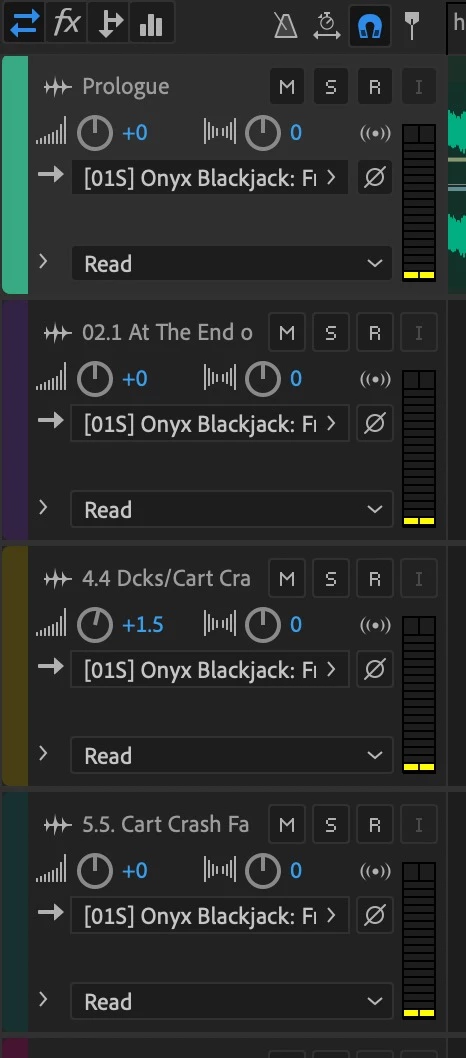
I opened a recent Audition session this morning because I needed to make an edit.  But, all my "output" settings have vanished from the Multitrack view.  (See photo below)


I HAVE already double-checked my "Audio Hardware" settings and they are correct.  It's just that I have. no way of adjusting the Output for each track in Multitrack view.


Can anyone assist?
 

This topic has been closed for replies.

1 reply

SteveG_AudioMasters_
Community Expert
Community Expert
March 7, 2024

Hehe! Drag the bottom edge of the track control box down very slightly... (and do it for all the other tracks too)

(same track)

And you always have a means of adjusting the individual tracks, even with the shrunk track display - just open up the mixer!


tonyrushAuthor
Participating Frequently
March 7, 2024

Ha!  What a rookie mistake on my part!  Thanks!  I didn't realize that was adjustable.  🙂


Thanks again!

Tony