
Participant
August 2, 2018
Question

Pan control gone missing

  • August 2, 2018
  • 3 replies
  • 6315 views

Hello all-

I was working on a multitrack project in Audition. Adjusting levels and panning tracks as needed. I then saved the session under a slightly different name so I could return to an older version if needed.

On the newly saved version the pan controls have disappeared. Does anyone know how I can get them back?

Here's some info. The session was set up as stereo, 48k, 24 bit.

I recorded the live instruments as mono tracks - selecting mono channel 02 on the input which is the guitar jack input on my Steinberg UR12 audio interface.

The outputs are set to default stereo

I later change the outputs to Master when exporting the session mixdown.


Here is a screenshot of the current set-up.
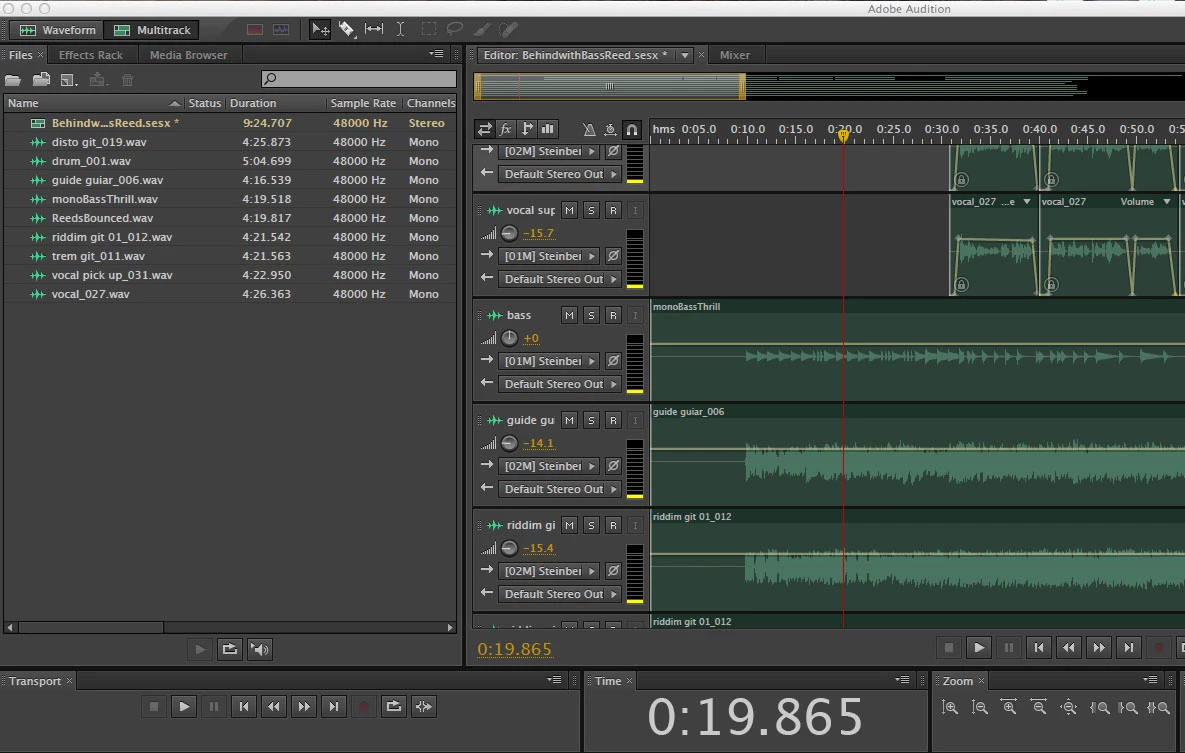
I have Googled and searched the forum with no luck.

Many thanks.

A.S

This topic has been closed for replies.

3 replies

Kevin-Monahan
Community Manager
Community Manager
August 16, 2018

A.S.,

Is your problem sorted out with the help of our experts? Let us know.

Thanks,
Kevin

Kevin Monahan - Sr. Community and Engagement Strategist – Adobe Pro Video and Audio
秉仁景13158355
Participant
November 7, 2019

Same problem here. File created with CC2019, and I am sure the master channel is stereo.
Created another multitrack session for test, no any audio clip inserted into channel, I can see the PAN knob. Click [Mixer] panel, there're PAN control as well. Go back to multitrack session, now the PAN knobs are gone. Clik [Mixer] again, the PAN control is still there, but cannot be found in the mutitrack session window.

Participant
December 26, 2019

Same problem here. Opened a stereofile, but I can't grab the pan of volume line

SteveG_AudioMasters_
Community Expert
Community Expert
August 2, 2018

Floralcaster  wrote

On the newly saved version the pan controls have disappeared. Does anyone know how I can get them back?

Here's some info. The session was set up as stereo, 48k, 24 bit.

The only times I've seen the pan controls disappear like that is when the session is mono, not stereo... if you open the original session, are they there then?

Floralcaster  wrote

I later change the outputs to Master when exporting the session mixdown.

Why do you not have the channel outputs set to Master anyway when they're not being recorded? The only time you need to have track outputs sent out is if you're using them as something to play against. The moment you aren't doing this any more, you should set them back to Master, otherwise you won't hear anything you've done in the way of mixing.

This doesn't cause anything to happen to the pan controls though; it's just not normal!

ryclark
Participating Frequently
August 2, 2018

Can't tell from your screen grab because we can't see the Master track but looks suspiciously like a Mono rather than Stereo session.

Also may we ask why you have all the Tracks routed to Default Stereo Out and have to change it later rather than the standard Master, which is normal for most Audition Multitrack sessions.