


adamt18510785
Inspiring
May 17, 2024
Question

Playback popup bug

  • May 17, 2024
  • 1 reply
  • 992 views

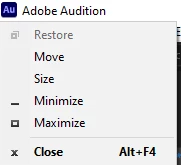
After I zoom into the timeline waveform, if I hit the space bar to play, the Move - Restore- Minimize popup, opens up in Windows, no issues on Mac. It's not the end of the world but it's obnoxious to use this program having to stop and click off the box every time I make a zoom and hit space. 

This box 


This topic has been closed for replies.

1 reply

SteveG_AudioMasters_
Community Expert
Community Expert
May 17, 2024

Since it doesn't do this for anybody else, I suspect that you've got a Microsoft shortcut key assigned somehow. I know, for instance, that if you hit Alt+Spacebar within Audition you can get that menu to show, so it's likely to be related to that. There's plenty of help from Microsoft about assigning keystrokes, so that's probably the best place to start. The other possibility is a keyboard short, of course. Not impossible considering where the Alt key is...

adamt18510785
Inspiring
May 18, 2024

No that shouldn't matter. That would make sense if I was holding down ALT while hitting the spacebar.  This is not the case, Alt-Zoom - let go - then spacebar.
Why is this the only program that has this issue? 
Why does all my other programs and DAWS not have this issue, this seems like a program UX problem on Adobe's end

SteveG_AudioMasters_
Community Expert
Community Expert
May 18, 2024

Okay - explanation: The standard layout has the = key as zoom in and the - key as zoom out, so no Alt key required. If you press the Alt key it will remember that as a part of a 2-key rollover, so when you hit the spacebar, you'll end up with the menu. So no, it's not a bug.


And as I said, it doesn't happen to anybody else because they aren't using the Alt key to zoom.