
Participant
January 8, 2020
Question

Premier - audition error

  • January 8, 2020
  • 2 replies
  • 800 views

Hello everyone;

We were using Premier Pro 2019 for a long time in my company and recently bought Audition for our editors.

When we try to "send" audio for editing to Audition we always get the dll error that you can see in the attached image.

We dont have Dynamic Link, is mandatory to have it in order to work?.

All the PC have the .dll in the route that appears in the message.
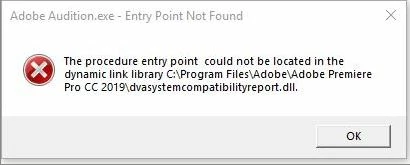
Does anyonw knows what could be happening?.

Regards.

 
This topic has been closed for replies.

2 replies

Legend
January 9, 2020

You say you have PP 2019.  But which exact version of Audition do you have?  I suspect, since you say you recently bought Audition that you have Audition 2020.

Although I am not a PP user I do know the advice here is that you need to maintain exact parity of versions if you are to have any chance of integrating PP with Audition.  So, if your Audition is latest 2020 version, PP needs to be latest 2020 version also.

HTH

SteveG_AudioMasters_
Community Expert
Community Expert
January 9, 2020

As emmrecs says, you need version parity. But if you have that, and are still experiencing problems, then we need to know. Reason being that this is suspected only to be a Mac issue, and you're running a PC. The Mac issue, incidentally, is entirely due to Catalina's enhanced 'security' preventing the dynamic link from working - wasn't a problem before. I am allowed to say that it's being worked on at present, but if it happens on a PC as well, the devs would definitely like a heads-up...

Participant
January 10, 2020

Hello;

The versions that have are:

Premiere:  13.1.4

Audition: 13.0.0.519


Could that be the reason of the error?, Which one you recommend to have it (for PC and MAC).


Regards


Bani Verma
Legend
January 9, 2020

Hi there,

I am moving your query to the correct community 'Audition', experts here will be able to help you better.